RDF Insert Methods in Virtuoso
- Loading RDF datasets into a Virtuoso Graph IRI
- Loading RDF datasets into one or more Virtuoso Graph IRIs
- Loading RDF datasets using the Conductor "Quad Store Upload" tab menu option
- RDF Sink Folders (Virtuoso or ODS-Briefcase)
- HTTP PUT
- HTTP POST
- Examples using LOAD feature of SPARUL
- SPARQL Insert via /sparql endpoint
- SPARQL Insert via HTTP Post using Content-Type: application/sparql-query and ODS wiki
- Example Using
- Example Using Linked Data Import folder and Upload from File
- Example Using Linked Data Import folder and a manually created resource with N3/Turtle content
- Example Using Virtuoso Crawler
- Examples using SPARQL 1.1 Graph Store HTTP Protocol
- Example using SPARQL Query & Sponger
- Example using Virtuoso PL APIs
- Example using SIMILE RDF Bank API
- Example using RDF NET
Loading RDF datasets into a Virtuoso Graph IRI
- Load TTL (TURTLE or N3 resource) datasets into Virtuoso Graph IRI
- Load RDF/XML datasets into Virtuoso Graph IRI
Loading RDF datasets into one or more Virtuoso Graph IRIs
Loading RDF datasets using the Conductor "Quad Store Upload" tab menu option
RDF Sink Folders (Virtuoso or ODS-Briefcase)
- Using Virtuoso RDF Sink Folder
- Using ODS RDF Sink Folder
- Using WebDAV and ODS-Briefcase Graphical Interfaces
HTTP PUT
Using this approach we can upload RDF resources into Virtuoso's WebDAV repository and then automatically upload the triples within the resource into the Virtuoso Quad store (if you so choose via Virtuoso's special RDF Sink Folder feature of WebDAV ).HTTP PUT Example 1
<rdf:RDF xmlns="http://www.example.com/jose/foaf.rdf#"
    xmlns:foaf="http://xmlns.com/foaf/0.1/"
    xmlns:log="http://www.w3.org/2000/10/swap/log#"
    xmlns:myfoaf="http://www.example.com/jose/foaf.rdf#"
    xmlns:rdf="http://www.w3.org/1999/02/22-rdf-syntax-ns#">

    <foaf:Person rdf:about="http://www.example.com/jose/foaf.rdf#jose">
        <foaf:homepage rdf:resource="http://www.example.com/jose/"/>
        <foaf:knows rdf:resource="http://www.example.com/jose/foaf.rdf#juan"/>
        <foaf:name>Jose Jimen~ez</foaf:name>
        <foaf:nick>Jo</foaf:nick>
        <foaf:workplaceHomepage rdf:resource="http://www.corp.example.com/"/>
    </foaf:Person>

    <foaf:Person rdf:about="http://www.example.com/jose/foaf.rdf#juan">
        <foaf:mbox rdf:resource="mailto:juan@mail.example.com"/>
    </foaf:Person>

    <foaf:Person rdf:about="http://www.example.com/jose/foaf.rdf#julia">
        <foaf:mbox rdf:resource="mailto:julia@mail.example.com"/>
    </foaf:Person>

    <rdf:Description rdf:about="http://www.example.com/jose/foaf.rdf#kendall">
        <foaf:knows rdf:resource="http://www.example.com/jose/foaf.rdf#edd"/>
    </rdf:Description>
</rdf:RDF>
File: myfoaf.rdf
Destination Server: demo.openlinksw.com

curl -T myfoaf.rdf http://demo.openlinksw.com/DAV/home/demo/rdf_sink/myfoaf.rdf -u demo:demo
<!DOCTYPE HTML PUBLIC "-//IETF//DTD HTML 2.0//EN">
<HTML>
<HEAD>
  <TITLE>201 Created</TITLE>
</HEAD>
<BODY>
  <H1>Created</H1>
  Resource /DAV/home/demo/rdf_sink/ myfoaf.rdf has been created.
</BODY>
</HTML>
HTTP PUT Example 2
- Create a folder of type "Linked Data Import" for an ODS user with the Briefcase application
- Go to http://cname/ods, click the "Sign In" link and login as user "demo" for example;
- Click the Briefcase application from the left vertical navigation bar;
- Click "New Folder";
- In the presented form specify the folder name and type, for example:
-
Folder name: "
MyData"; -
Folder type: "Linked Data Import"
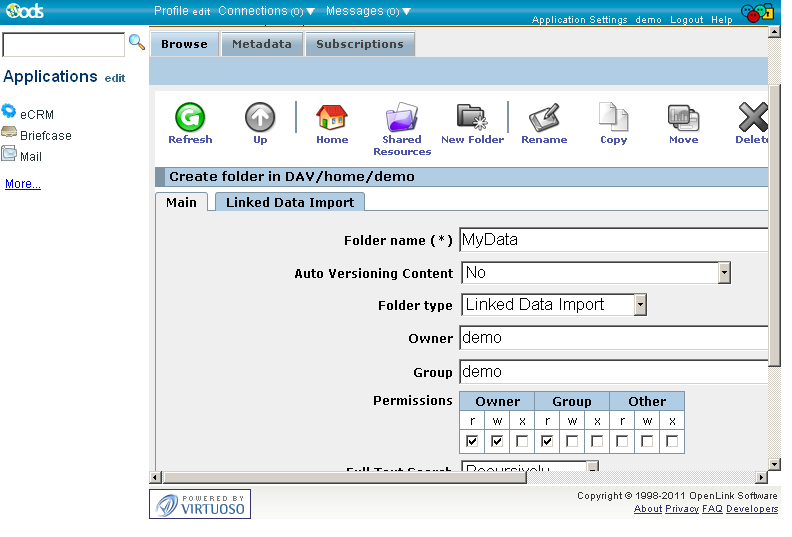
-
Folder name: "
- Go to the tab "Linked Data Import";
- Specify "Graph name", for example "urn:mydata";
- Select the "Sponger (on/off)" check-box option to enable the Virtuoso sponger for use.
- Optionally you can select which cartridges to be included from the "Sponger Extractor Cartridges" and "Sponger Meta Cartridges" lists:
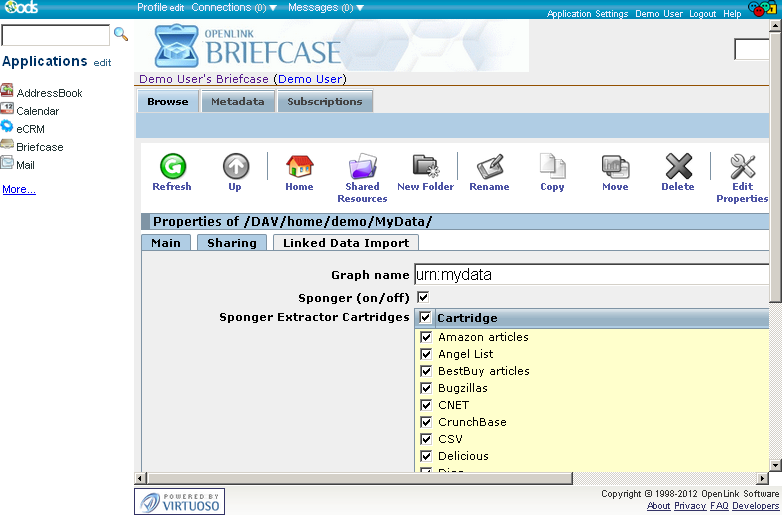
- Optionally you can select which cartridges to be included from the "Sponger Extractor Cartridges" and "Sponger Meta Cartridges" lists:
- Click "Create".
- As result the new folder will be created.
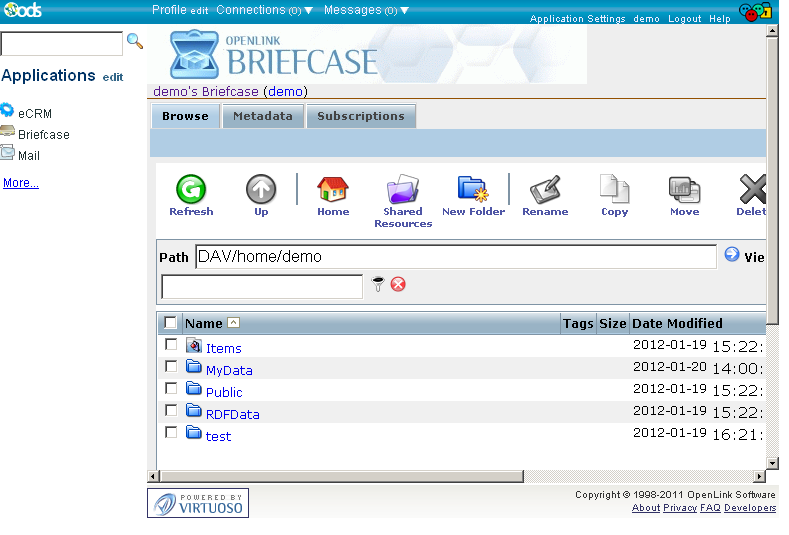
- Assume the existence of a local file called "kidehen.n3" containing:
<http://www.openlinksw.com/dataspace/kidehen@openlinksw.com#this> <http://www.w3.org/1999/02/22-rdf-syntax-ns#type> <http://rdfs.org/sioc/ns#User> .
<http://www.openlinksw.com/dataspace/kidehen@openlinksw.com#this> <http://www.w3.org/2000/01/rdf-schema#label> 	"Kingsley" .
<http://www.openlinksw.com/dataspace/kidehen@openlinksw.com#this> <http://rdfs.org/sioc/ns#creator_of> <http://www.openlinksw.com/dataspace/kidehen@openlinksw.com/weblog/kidehen@openlinksw.com%27s%20BLOG%20%5B127%5D/1300> .
- Run the following command from a terminal shell, where
cnameis replaced with the actual Virtuosohost:portto load the file to the specified location:
$ curl -T kidehen.n3 http://cname/DAV/home/demo/MyData/ -u demo:demo
<!DOCTYPE HTML PUBLIC "-//IETF//DTD HTML 2.0//EN">
  <HTML>
    <HEAD>
      <TITLE>201 Created</TITLE>
    </HEAD>
    <BODY>
      <H1>Created</H1>Resource /DAV/home/demo/MyData/kidehen.n3 has been created.
    </BODY>
  </HTML>
- Go to Briefcase application and view the content of the folder "DAV/home/demo/
MyData" - As a result of the curl command to uploaded file "kidehen.n3" an additional file "urn_mydata.RDF" is available as the identifier for the Linked Data graph created in the Quad Store:
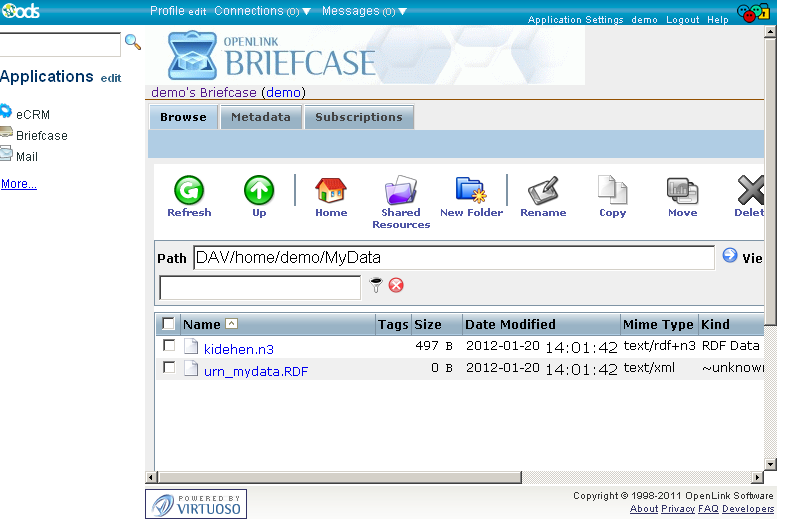
- The inserted triples can be queried from the Virtuoso SPARQL endpoint, i.e.
http://cname/sparqlby:- Entering the query below in the "Query Text" window:
SELECT *
FROM <urn:mydata>
WHERE
  {
    ?s ?p ?o
  }
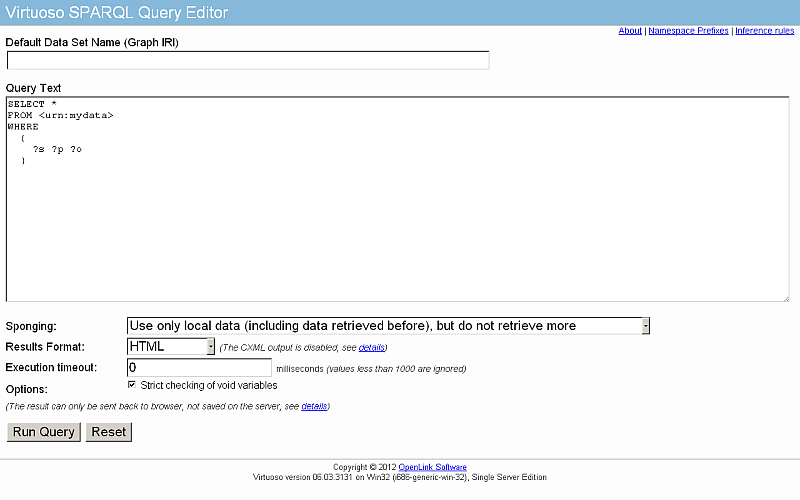
- Click the "Run Query" button;
- The inserted triples from the "kidehen.n3" is displayed as the result set:

- Entering the query below in the "Query Text" window:
References
HTTP POST
Virtuoso's support for HTTP content negotiation and the SPARQL Protocol enables the execution of SPARUL as part of an HTTP POST payload using Content-Type: application/sparql-query.HTTP POST Example 1
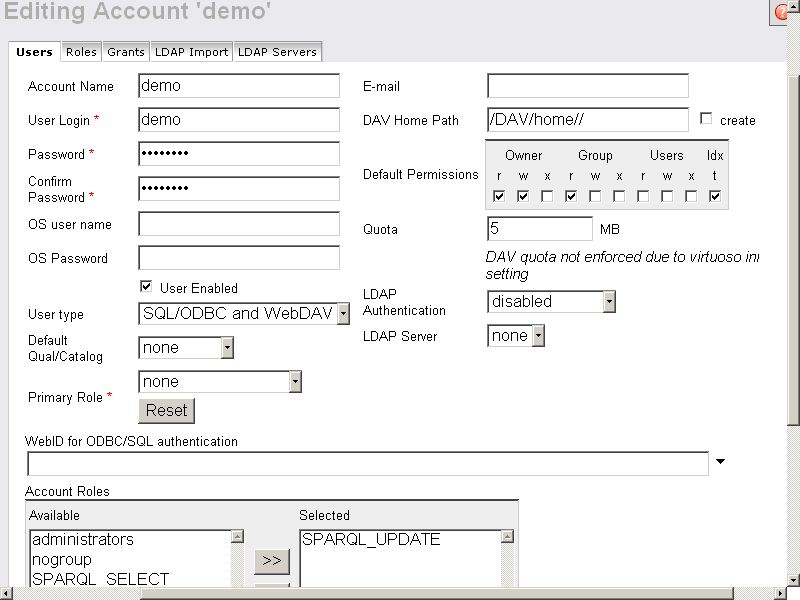
- For user demo from Conductor → System Admin → User Accounts → user demo → Edit, make sure the following properties are set:
-
User type is
SQL/ODBC and WebDAV; -
Accounts Roles contains in "Selected" list
SPARQL_UPDATE:
-
User type is
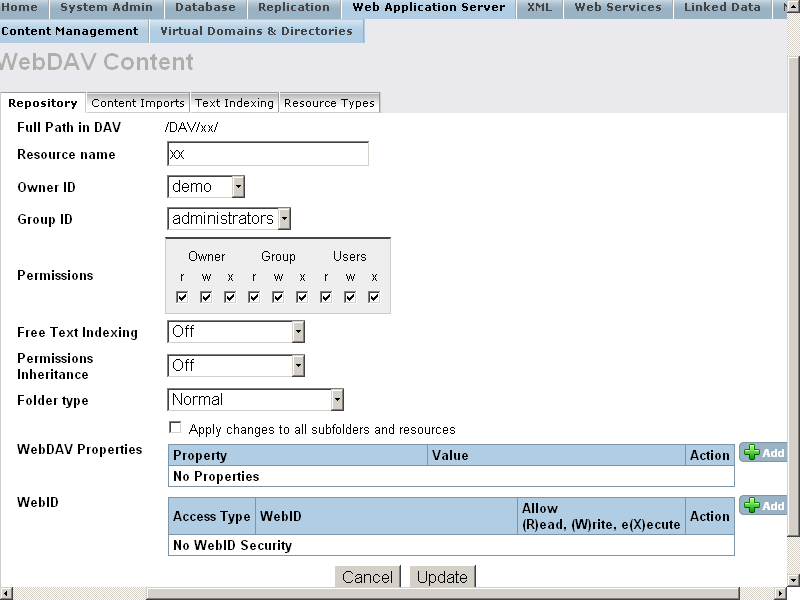
- From Conductor → Web Application Server → Content Management or ODS Briefcase UI create a DAV collection "xx" with the following properties:
- owner is user demo (the user's password let's say is "demo");
-
permissions set to
rwxrwxrwxn:
- Execute the following command:
curl -i -d "INSERT {<http://demo.openlinksw.com/DAV/home/demo_about.rdf>
<http://www.w3.org/1999/02/22-rdf-syntax-ns#type> <http://rdfs.org/sioc/ns#User>}"  -u "demo:demo"
-H "Content-Type: application/sparql-query" http://localhost:8890/DAV/xx/yy
- The response should be:
HTTP/1.1 201 Created
Server: Virtuoso/05.00.3023 (Win32) i686-generic-win-32  VDB
Connection: Keep-Alive
Content-Type: text/html; charset=ISO-8859-1
Date: Fri, 28 Dec 2007 12:50:12 GMT
Accept-Ranges: bytes
MS-Author-Via: SPARQL
Content-Length: 0
- the result in the DAV/xx location will be a new WebDAV resource with name "yy" containing the inserted RDF:
<?xml version="1.0" encoding="utf-8" ?>
<rdf:RDF xmlns:rdf="http://www.w3.org/1999/02/22-rdf-syntax-ns#"
xmlns:rdfs="http://www.w3.org/2000/01/rdf-schema#">
<rdf:Description
rdf:about="http://demo.openlinksw.com/DAV/home/demo_about.rdf">
<ns0pred:type xmlns:ns0pred="http://www.w3.org/1999/02/22-rdf-syntax-ns#"
rdf:resource="http://rdfs.org/sioc/ns#User"/>
</rdf:Description>
</rdf:RDF>
HTTP POST Example 2
- Create a DAV collection, for ex.
with name "test" for user for ex.
demo with password demo.
- Note: user "demo" should have from "User type": SQL/ODBC and WebDAV and should have "SPARQL_UPDATE" role set from Conductor → System Admin → User Accounts → user demo, Edit Properties.
- Execute the following command:
curl -i -d "INSERT IN GRAPH <http://mygraph.com>
{ <http://www.openlinksw.com/dataspace/kidehen@openlinksw.com#this>
  <http://www.w3.org/1999/02/22-rdf-syntax-ns#type>
  <http://rdfs.org/sioc/ns#User> .
  <http://www.openlinksw.com/dataspace/kidehen@openlinksw.com#this>
  <http://www.w3.org/2000/01/rdf-schema#label>
  <Kingsley Uyi Idehen> .
  <http://www.openlinksw.com/dataspace/kidehen@openlinksw.com#this>
  <http://rdfs.org/sioc/ns#creator_of>
  <http://www.openlinksw.com/dataspace/kidehen@openlinksw.com/weblog/kidehen@openlinksw.com%27s%20BLOG%20%5B127%5D/1300>
  } " -u "demo:demo" -H "Content-Type: application/sparql-query" http://localhost:8890/DAV/home/demo/test/myrq
- As result the response will be:
HTTP/1.1 201 Created
Server: Virtuoso/05.00.3023 (Win32) i686-generic-win-32  VDB
Connection: Keep-Alive
Content-Type: text/html; charset=ISO-8859-1
Date: Thu, 20 Dec 2007 16:25:25 GMT
Accept-Ranges: bytes
MS-Author-Via: SPARQL
Content-Length: 0
- Now let's check the inserted triples.
Go to the SPARQL endpoint, i.e.,
http://localhost:8890/sparqland:- Enter for Default Graph URI:
http://mygraph.com
- Enter in the Query area:
SELECT * WHERE {?s ?p ?o}
- Click the button "Run Query"
- As result will be shown the inserted triples:
s                                                                 p                                                 o
http://www.openlinksw.com/dataspace/kidehen@openlinksw.com#this   http://www.w3.org/1999/02/22-rdf-syntax-ns#type   http://rdfs.org/sioc/ns#User
http://www.openlinksw.com/dataspace/kidehen@openlinksw.com#this   http://www.w3.org/2000/01/rdf-schema#label        Kingsley
http://www.openlinksw.com/dataspace/kidehen@openlinksw.com#this   http://rdfs.org/sioc/ns#creator_of                http://www.openlinksw.com/dataspace/kidehen@openlinksw.com/weblog/kidehen@openlinksw.com%27s%20BLOG%20%5B127%5D/1300
- Enter for Default Graph URI:
Examples using LOAD feature of SPARUL
Using the file: protocol specifier
- An RDF file can be loaded from an absolute path on the file system (whose location is specified in the
DirsAllowedparam in the INI file) using thefile:///URI scheme:
SQL> sparql load <file:///home/virtuoso/database/data/test.rdf> into <test>;

Done. -- 48 msec.
SQL> sparql select count(*) from <test> where {?s ?p ?o};
callret-0
INTEGER
_______________________________________________________________________________

31

1 Rows. -- 1 msec.
SQL>
- An RDF file can also be uploaded directly from the Virtuoso Web Server root(~/vsp) directory using the
file:/URI scheme:
SQL> sparql load <file:/test.rdf> into <test>;
Done. -- 8 msec.
SQL> sparql select count(*) from <test> where {?s ?p ?o};
callret-0
INTEGER
_______________________________________________________________________________

31

1 Rows. -- 1 msec.
SQL>
Using a SPARQL query stored on DAV
- Execute from ISQL:
SPARQL INSERT IN GRAPH <http://mygraph.com>
{
  <http://myopenlink.net/dataspace/Kingsley#this>
  <http://www.w3.org/1999/02/22-rdf-syntax-ns#type>
  <http://rdfs.org/sioc/ns#User> .

  <http://myopenlink.net/dataspace/Kingsley#this>
  <http://rdfs.org/sioc/ns#id>
  <Kingsley> .

  <http://myopenlink.net/dataspace/Caroline#this>
  <http://www.w3.org/1999/02/22-rdf-syntax-ns#type>
  <http://rdfs.org/sioc/ns#User> .

  <http://myopenlink.net/dataspace/Caroline#this>
  <http://rdfs.org/sioc/ns#id>
  <Caroline> .

  <http://myopenlink.net/dataspace/Matt#this>
  <http://www.w3.org/1999/02/22-rdf-syntax-ns#type>
  <http://rdfs.org/sioc/ns#User> .

  <http://myopenlink.net/dataspace/Matt#this>
  <http://rdfs.org/sioc/ns#id>
  <Matt> .

  <http://myopenlink.net/dataspace/demo#this>
  <http://www.w3.org/1999/02/22-rdf-syntax-ns#type>
  <http://rdfs.org/sioc/ns#User> .

  <http://myopenlink.net/dataspace/demo#this>
  <http://rdfs.org/sioc/ns#id>
  <demo> .

};
- Create DAV collection which is visible to public, for ex: http://localhost:8890/DAV/tmp
- Upload to the DAV collection the following file for ex.
with name listall.rq and with the following content:
PREFIX rdf: <http://www.w3.org/1999/02/22-rdf-syntax-ns#>
PREFIX rdfs: <http://www.w3.org/2000/01/rdf-schema#>
PREFIX sioc: <http://rdfs.org/sioc/ns#>
SELECT ?x ?p ?o
FROM <http://mygraph.com>
WHERE
  {
    ?x rdf:type sioc:User .
    ?x ?p ?o.
    ?x sioc:id ?id .
    FILTER REGEX(str(?id), "^King")
  }
ORDER BY ?x
- Now from ISQL execute the following command:
SPARQL
LOAD bif:concat ("http://", bif:registry_get("URIQADefaultHost"), "/DAV/tmp/listall.rq") INTO GRAPH <http://myNewGraph.com>;
- As result should be shown the message:
callret-0
VARCHAR
_______________________________________________________________________________

Load <http://localhost:8890/DAV/tmp/listall.rq> into graph <http://myNewGraph.com> -- done

1 Rows. -- 321 msec.
SPARQL Insert via /sparql endpoint
SPARQL INSERT operation can be sent to a web service endpoint as a single statement and executed in sequence.
Example
Using the Virtuoso ISQL tool or using the /sparql UI, for ex. at http://localhost:8890/sparql, execute the following:
- Insert into graph http://BookStore.com 3 triples:
SPARQL INSERT IN GRAPH <http://BookStore.com>
{ <http://www.dajobe.org/foaf.rdf#i> <http://purl.org/dc/elements/1.1/date> <1999-04-01T00:00:00> .
  <http://www.w3.org/People/Berners-Lee/card#i> <http://purl.org/dc/elements/1.1/date> <1998-05-03T00:00:00> .
  <http://www.w3.org/People/Connolly/#me> <http://purl.org/dc/elements/1.1/date> <2001-02-08T00:00:00> };
- As result will be shown the message:
Insert into <http://BookStore.com>, 3 triples -- done
- Next we will select all triples from the graph http://BookStore.com:
SPARQL SELECT * FROM <http://BookStore.com> WHERE {?s ?p ?o};
- As result will be shown:
s                                              p                                       o
VARCHAR                                        VARCHAR                                 VARCHAR
_______________________________________________________________________________

http://www.w3.org/People/Berners-Lee/card#i    http://purl.org/dc/elements/1.1/date    1998-05-03T00:00:00
http://www.w3.org/People/Connolly/#me          http://purl.org/dc/elements/1.1/date    2001-02-08T00:00:00
http://www.dajobe.org/foaf.rdf#i               http://purl.org/dc/elements/1.1/date    1999-04-01T00:00:00

3 Rows. -- 0 msec.
- Now let's insert into graph another http://NewBookStore.com graph's values:
SPARQL
PREFIX dc:  <http://purl.org/dc/elements/1.1/>
PREFIX xsd: <http://www.w3.org/2001/XMLSchema#>
INSERT INTO GRAPH <http://NewBookStore.com> { ?book ?p ?v }
WHERE
  { GRAPH  <http://BookStore.com>
   { ?book dc:date ?date
     FILTER ( xsd:dateTime(?date) < xsd:dateTime("2000-01-01T00:00:00")).
     ?book ?p ?v.
   }
  };
- As result will be shown:
callret-0
VARCHAR
_______________________________________________________________________________

Insert into <http://NewBookStore.com>, 2 triples -- done
- Finally we will check the triples from the graph NewBookStore.com:
SQL> sparql select * from <http://NewBookStore.com> where {?s ?p ?o};
- As result will be shown:
s                                             p                                      o
VARCHAR                                       VARCHAR                                VARCHAR
_______________________________________________________________________________

http://www.w3.org/People/Berners-Lee/card#i   http://purl.org/dc/elements/1.1/date   1998-05-03T00:00:00
http://www.dajobe.org/foaf.rdf#i              http://purl.org/dc/elements/1.1/date   1999-04-01T00:00:00

2 Rows. -- 10 msec.
References
SPARQL Insert via HTTP Post using Content-Type: application/sparql-query and ODS wiki
- With HTTP Post and ODS wiki, you can write an RDF document and perform INSERT/UPDATE actions over it.
- You can write to a file using SIOC terms for ODS-Wiki.
- You can check with sparql the inserted / updated triples in the Quad Store.
Example
- Suppose there is ODS user test3 with ODS password 1, which has testWiki wiki instance.
- Execute the following:
curl -i -d "INSERT {
  <http://localhost:8890/dataspace/test3/wiki/testWiki>         <http://atomowl.org/ontologies/atomrdf#contains>   <http://localhost:8890/dataspace/test3/wiki/testWiki/MyTest>  .
  <http://localhost:8890/dataspace/test3/wiki/testWiki/MyTest>  <http://rdfs.org/sioc/ns#has_container>            <http://localhost:8890/dataspace/test3/wiki/testWiki>         .
  <http://localhost:8890/dataspace/test3/wiki/testWiki>         <http://atomowl.org/ontologies/atomrdf#entry>      <http://localhost:8890/dataspace/test3/wiki/testWiki/MyTest>  .
  <http://localhost:8890/dataspace/test3/wiki/testWiki>         <http://rdfs.org/sioc/ns#container_of>             <http://localhost:8890/dataspace/test3/wiki/testWiki/MyTest>  .
  <http://localhost:8890/dataspace/test3/wiki/testWiki/MyTest>  <http://rdfs.org/sioc/ns#topic>                    <http://localhost:8890/dataspace/test3/wiki/testWiki>         .
  <http://localhost:8890/dataspace/test3/wiki/testWiki/MyTest>  <http://atomowl.org/ontologies/atomrdf#source>     <http://localhost:8890/dataspace/test3/wiki/testWiki>         .
  <http://localhost:8890/dataspace/test3/wiki/testWiki/MyTest>  <http://www.w3.org/1999/02/22-rdf-syntax-ns#type>  <http://rdfs.org/sioc/types#Comment>                          .
  <http://localhost:8890/dataspace/test3/wiki/testWiki/MyTest>  <http://www.w3.org/1999/02/22-rdf-syntax-ns#type>  <http://atomowl.org/ontologies/atomrdf#Entry>                 .
  <http://localhost:8890/dataspace/test3/wiki/testWiki/MyTest>  <http://www.w3.org/2000/01/rdf-schema#label>       'MyTest'                                                      .
  <http://localhost:8890/dataspace/test3/wiki/testWiki/MyTest>  <http://www.w3.org/1999/02/22-rdf-syntax-ns#type>  <http://atomowl.org/ontologies/atomrdf#Link>                  .
  <http://localhost:8890/dataspace/test3/wiki/testWiki/MyTest>  <http://rdfs.org/sioc/ns#content>                  <test>
}" -u "test3:1" -H "Content-Type: application/sparql-query" http://localhost:8890/DAV/home/test3/wiki/testWiki/MyTest
- As result we should have 2 files created:
- In the user DAV folder "DAV/home/test3/wiki/testWiki/" will be created a file "
MyTest" with type "application/sparql-query". - You can view the content of this file from from the Conductor UI or from the user's Briefcase UI, path "DAV/home/test3/wiki/testWiki":
- It content will be:
<?xml version="1.0" encoding="utf-8" ?>
<rdf:RDF xmlns:rdf="http://www.w3.org/1999/02/22-rdf-syntax-ns#" xmlns:rdfs="http://www.w3.org/2000/01/rdf-schema#">
<rdf:Description rdf:about="http://localhost:8890/dataspace/test3/wiki/testWiki"><ns0pred:entry xmlns:ns0pred="http://atomowl.org/ontologies/atomrdf#" rdf:resource="http://localhost:8890/dataspace/test3/wiki/testWiki/MyTest"/></rdf:Description>
<rdf:Description rdf:about="http://localhost:8890/dataspace/test3/wiki/testWiki/MyTest"><ns0pred:label xmlns:ns0pred="http://www.w3.org/2000/01/rdf-schema#">MyTest</ns0pred:label></rdf:Description>
<rdf:Description rdf:about="http://localhost:8890/dataspace/test3/wiki/testWiki/MyTest"><ns0pred:type xmlns:ns0pred="http://www.w3.org/1999/02/22-rdf-syntax-ns#" rdf:resource="http://atomowl.org/ontologies/atomrdf#Link"/></rdf:Description>
<rdf:Description rdf:about="http://localhost:8890/dataspace/test3/wiki/testWiki/MyTest"><ns0pred:type xmlns:ns0pred="http://www.w3.org/1999/02/22-rdf-syntax-ns#" rdf:resource="http://rdfs.org/sioc/types#Comment"/></rdf:Description>
<rdf:Description rdf:about="http://localhost:8890/dataspace/test3/wiki/testWiki/MyTest"><ns0pred:type xmlns:ns0pred="http://www.w3.org/1999/02/22-rdf-syntax-ns#" rdf:resource="http://atomowl.org/ontologies/atomrdf#Entry"/></rdf:Description>
<rdf:Description rdf:about="http://localhost:8890/dataspace/test3/wiki/testWiki/MyTest"><ns0pred:has_container xmlns:ns0pred="http://rdfs.org/sioc/ns#" rdf:resource="http://localhost:8890/dataspace/test3/wiki/testWiki"/></rdf:Description>
<rdf:Description rdf:about="http://localhost:8890/dataspace/test3/wiki/testWiki"><ns0pred:container_of xmlns:ns0pred="http://rdfs.org/sioc/ns#" rdf:resource="http://localhost:8890/dataspace/test3/wiki/testWiki/MyTest"/></rdf:Description>
<rdf:Description rdf:about="http://localhost:8890/dataspace/test3/wiki/testWiki"><ns0pred:contains xmlns:ns0pred="http://atomowl.org/ontologies/atomrdf#" rdf:resource="http://localhost:8890/dataspace/test3/wiki/testWiki/MyTest"/></rdf:Description>
<rdf:Description rdf:about="http://localhost:8890/dataspace/test3/wiki/testWiki/MyTest"><ns0pred:content xmlns:ns0pred="http://rdfs.org/sioc/ns#">test</ns0pred:content></rdf:Description>
<rdf:Description rdf:about="http://localhost:8890/dataspace/test3/wiki/testWiki/MyTest"><ns0pred:topic xmlns:ns0pred="http://rdfs.org/sioc/ns#" rdf:resource="http://localhost:8890/dataspace/test3/wiki/testWiki"/></rdf:Description>
<rdf:Description rdf:about="http://localhost:8890/dataspace/test3/wiki/testWiki/MyTest"><ns0pred:source xmlns:ns0pred="http://atomowl.org/ontologies/atomrdf#" rdf:resource="http://localhost:8890/dataspace/test3/wiki/testWiki"/></rdf:Description>
</rdf:RDF>
- To the user's wiki instance will be added a new
WikiWord " MyTest" with content the value of the SIOC term attribue "content":
<http://localhost:8890/dataspace/test3/wiki/testWiki/MyTest> <http://rdfs.org/sioc/ns#content> <test>
i.e., the content will be "test".- You can view this file in path "DAV/home/test3/wiki/testWiki/" and its name will be "
MyTest.txt". - Using the ODS wiki UI you can:
- Go to Index link
- As result the
MyTest article will be shown in the given list. Click on its link. - As result the content of the article will be shown.
- You can view this file in path "DAV/home/test3/wiki/testWiki/" and its name will be "
- In the user DAV folder "DAV/home/test3/wiki/testWiki/" will be created a file "
- Now lets check what data was inserted in the Quad Store:
- Go to the sparql endpoint, i.e. for ex. to http://localhost:8890/sparql
- Enter for Default Graph URI:
http://localhost:8890/DAV/home/test3/wiki/testWiki/MyTest
- Enter for Query text:
SELECT * WHERE {?s ?p ?o}
- Click the "Run Query" button.
- As result will be shown the inserted triples:
s                                                             p                                                 o
http://localhost:8890/dataspace/test3/wiki/testWiki           http://rdfs.org/sioc/ns#container_of              http://localhost:8890/dataspace/test3/wiki/testWiki/MyTest
http://localhost:8890/dataspace/test3/wiki/testWiki           http://atomowl.org/ontologies/atomrdf#entry       http://localhost:8890/dataspace/test3/wiki/testWiki/MyTest
http://localhost:8890/dataspace/test3/wiki/testWiki           http://atomowl.org/ontologies/atomrdf#contains    http://localhost:8890/dataspace/test3/wiki/testWiki/MyTest
http://localhost:8890/dataspace/test3/wiki/testWiki/MyTest    http://www.w3.org/1999/02/22-rdf-syntax-ns#type   http://rdfs.org/sioc/types#Comment
http://localhost:8890/dataspace/test3/wiki/testWiki/MyTest    http://www.w3.org/1999/02/22-rdf-syntax-ns#type   http://atomowl.org/ontologies/atomrdf#Entry
http://localhost:8890/dataspace/test3/wiki/testWiki/MyTest    http://www.w3.org/1999/02/22-rdf-syntax-ns#type   http://atomowl.org/ontologies/atomrdf#Link
http://localhost:8890/dataspace/test3/wiki/testWiki/MyTest    http://www.w3.org/2000/01/rdf-schema#label        MyTest
http://localhost:8890/dataspace/test3/wiki/testWiki/MyTest    http://rdfs.org/sioc/ns#has_container             http://localhost:8890/dataspace/test3/wiki/testWiki
http://localhost:8890/dataspace/test3/wiki/testWiki/MyTest    http://rdfs.org/sioc/ns#content                   test
http://localhost:8890/dataspace/test3/wiki/testWiki/MyTest    http://rdfs.org/sioc/ns#topic                     http://localhost:8890/dataspace/test3/wiki/testWiki
http://localhost:8890/dataspace/test3/wiki/testWiki/MyTest    http://atomowl.org/ontologies/atomrdf#source      http://localhost:8890/dataspace/test3/wiki/testWiki
References
Example Using WebDAV
Mount folder to DAV and dump; if this is the rdf_sink the Quad Store is updated automatically, or you can load from DAV manually to quad store.
- Using ODS Briefcase:
- Go to your ods location, for ex. http://localhost:8890/ods
- Register user, for ex. user test1
- Login if not already in ods
- Go to ODS → Briefcase
- Create new instance
- Go to the briefcase instance by clicking its name link
- Upload file in a new created folder mytest or in the rdf_sink folder with:
- checked option "RDF Store"
- set RDF Graph Name, for example,
http://localhost:8890/DAV/home/test1/<name of the current folder>/, e.g.,http://localhost:8890/DAV/home/test1/mytest/orhttp://localhost:8890/DAV/home/test1/rdf_sink/ - For example, upload the following file with name
jose.rdf.
<rdf:RDF xmlns="http://www.example.com/jose/foaf.rdf#"
    xmlns:foaf="http://xmlns.com/foaf/0.1/"
    xmlns:log="http://www.w3.org/2000/10/swap/log#"
    xmlns:myfoaf="http://www.example.com/jose/foaf.rdf#"
    xmlns:rdf="http://www.w3.org/1999/02/22-rdf-syntax-ns#">

    <foaf:Person rdf:about="http://www.example.com/jose/foaf.rdf#jose">
        <foaf:homepage rdf:resource="http://www.example.com/jose/"/>
        <foaf:knows rdf:resource="http://www.example.com/jose/foaf.rdf#juan"/>
        <foaf:name>Jose Jimen~ez</foaf:name>
        <foaf:nick>Jo</foaf:nick>
        <foaf:workplaceHomepage rdf:resource="http://www.corp.example.com/"/>
    </foaf:Person>

    <foaf:Person rdf:about="http://www.example.com/jose/foaf.rdf#juan">
        <foaf:mbox rdf:resource="mailto:juan@mail.example.com"/>
    </foaf:Person>

    <foaf:Person rdf:about="http://www.example.com/jose/foaf.rdf#julia">
        <foaf:mbox rdf:resource="mailto:julia@mail.example.com"/>
    </foaf:Person>

    <rdf:Description rdf:about="http://www.example.com/jose/foaf.rdf#kendall">

        <foaf:knows rdf:resource="http://www.example.com/jose/foaf.rdf#edd"/>
    </rdf:Description>
</rdf:RDF>
- Execute the following query:
-- for specified user folder:
SELECT * FROM <http://localhost:8890/DAV/home/test1/mytest/>
WHERE {?s ?p ?o}
-- or if the file is uploaded into the rdf_sink folder
SELECT * FROM <http://localhost:8890/DAV/home/test1/rdf_sink/>
WHERE {?s ?p ?o}
- As result the following triples should be found:
s                                         p                                                  o
http://www.example.com/jose/foaf.rdf#jose     http://www.w3.org/1999/02/22-rdf-syntax-ns#type    http://xmlns.com/foaf/0.1/Person
http://www.example.com/jose/foaf.rdf#jose     http://xmlns.com/foaf/0.1/nick                     Jo
http://www.example.com/jose/foaf.rdf#jose     http://xmlns.com/foaf/0.1/name                     Jose Jimen~ez
http://www.example.com/jose/foaf.rdf#jose     http://xmlns.com/foaf/0.1/knows                    http://www.example.com/jose/foaf.rdf#juan
http://www.example.com/jose/foaf.rdf#jose     http://xmlns.com/foaf/0.1/homepage                 http://www.example.com/jose/
http://www.example.com/jose/foaf.rdf#jose     http://xmlns.com/foaf/0.1/workplaceHomepage        http://www.corp.example.com/
http://www.example.com/jose/foaf.rdf#kendall  http://xmlns.com/foaf/0.1/knows                    http://www.example.com/jose/foaf.rdf#edd
http://www.example.com/jose/foaf.rdf#julia    http://www.w3.org/1999/02/22-rdf-syntax-ns#type    http://xmlns.com/foaf/0.1/Person
http://www.example.com/jose/foaf.rdf#julia    http://xmlns.com/foaf/0.1/mbox                     mailto:julia@mail.example.com
http://www.example.com/jose/foaf.rdf#juan     http://www.w3.org/1999/02/22-rdf-syntax-ns#type    http://xmlns.com/foaf/0.1/Person
http://www.example.com/jose/foaf.rdf#juan     http://xmlns.com/foaf/0.1/mbox                     mailto:juan@mail.example.com
- Using Conductor UI:
- Go to Conductor UI, for ex. at http://localhost:8890/conductor
- Login as dba user
- Go to WebDAV&HTTP and create new folder, for ex. test
- Upload in the folder test a file, for ex.
the file jose.rdf from above with options:
- Destination: RDF Store
- Set the RDF IRI
Example Using Linked Data Import folder and Upload from File
- Create for ODS user demo a folder from type "Linked Data Import" using the Briefcase UI:
- Go to http://cname/ods and click Sign In
- Enter user demo log in credentials
- Click Briefcase from the left vertical navigation bar
- Click "New Folder"
- In the presented form specify for ex.:
-
Folder name: "
MyData" -
Folder type: "Linked Data Import"
-
Folder name: "
- Go to tab "Linked Data Import"
- Specify "Graph name", for ex. "urn:mydata"
- Hatch "Sponger (on/off)" check-box, which setting will enable the Sponger usage
- Optionally you can select which cartridges to be included from the "Sponger Extractor Cartridges" and "Sponger Meta Cartridges" lists:
- Optionally you can select which cartridges to be included from the "Sponger Extractor Cartridges" and "Sponger Meta Cartridges" lists:
- Click "Create".
- As result the new folder should be created:
- Click its name link:
- Click "Upload".
- In the presented form:
- Choose "Destination": WebDAV;
- Specify the source for the n3, .ttl etc.
file we are going to import.
For example, choose source "File" and click "Choose file" in order to select from your local filesystem for ex.
a file with name "kidehen.n3" and content as follows:
<http://www.openlinksw.com/dataspace/kidehen@openlinksw.com#this> <http://www.w3.org/1999/02/22-rdf-syntax-ns#type> <http://rdfs.org/sioc/ns#User> .
<http://www.openlinksw.com/dataspace/kidehen@openlinksw.com#this> <http://www.w3.org/2000/01/rdf-schema#label> 	"Kingsley" .
<http://www.openlinksw.com/dataspace/kidehen@openlinksw.com#this> <http://rdfs.org/sioc/ns#creator_of> <http://www.openlinksw.com/dataspace/kidehen@openlinksw.com/weblog/kidehen@openlinksw.com%27s%20BLOG%20%5B127%5D/1300> .
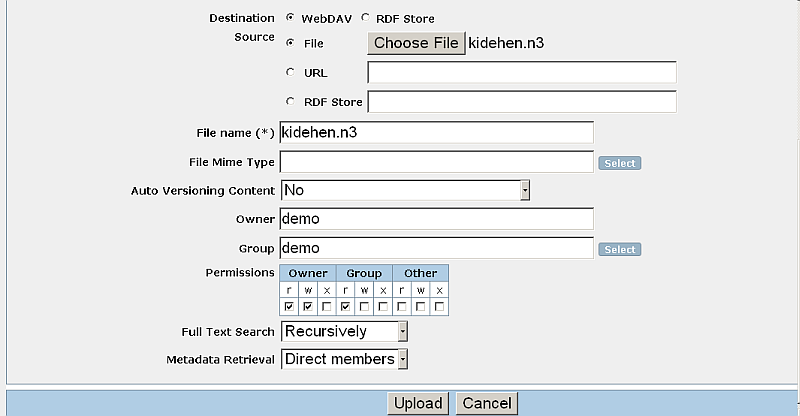
- Click "Upload".
- Should be created a new file with the name as specified in the form from above:
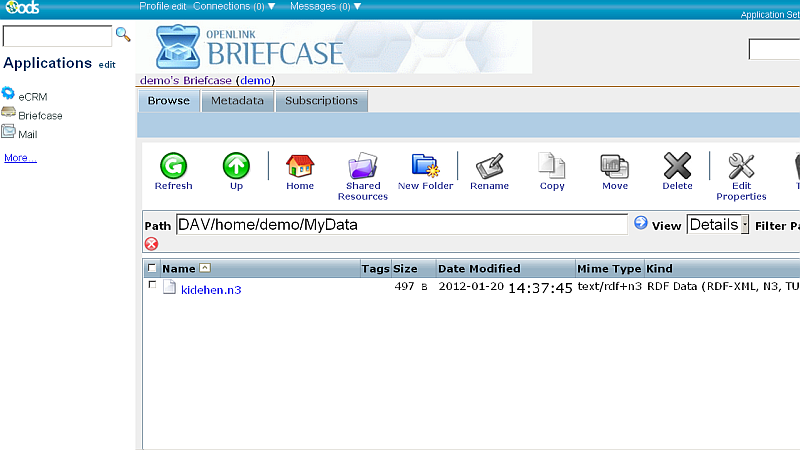
- Now let's check the inserted triples.
Go to your Virtuoso SPARQL endpoint, i.e.,
http://cname/sparqland:- Enter in the Query area the following simple query:
SELECT *
FROM <urn:mydata>
WHERE
  {
    ?s ?p ?o
  }
- Click the button "Run Query"
- As result will be shown the inserted triples:
s                                                                 p                                                 o
http://www.openlinksw.com/dataspace/kidehen@openlinksw.com#this   http://www.w3.org/1999/02/22-rdf-syntax-ns#type   http://rdfs.org/sioc/ns#User
http://www.openlinksw.com/dataspace/kidehen@openlinksw.com#this   http://www.w3.org/2000/01/rdf-schema#label        Kingsley
http://www.openlinksw.com/dataspace/kidehen@openlinksw.com#this   http://rdfs.org/sioc/ns#creator_of                http://www.openlinksw.com/dataspace/kidehen@openlinksw.com/weblog/kidehen@openlinksw.com%27s%20BLOG%20%5B127%5D/1300
- Enter in the Query area the following simple query:
Example Using Linked Data Import folder and a manually created resource with N3/Turtle content
- Create for ODS user demo a folder from type "Linked Data Import" using the Briefcase UI:
- Go to http://cname/ods and click Sign In;
- Enter user demo log in credentials;
- Click Briefcase from the left vertical navigation bar;
- Click "New Folder";
- In the presented form specify for ex.:
-
Folder name: "
MyData"; -
Folder type: "Linked Data Import"
-
Folder name: "
- Go to tab "Linked Data Import";
- Specify "Graph name", for ex. "urn:mydata";
- Hatch "Sponger (on/off)" check-box, which setting will enable the Sponger usage.
- Optionally you can select which cartridges to be included from the "Sponger Extractor Cartridges" and "Sponger Meta Cartridges" lists:
- Optionally you can select which cartridges to be included from the "Sponger Extractor Cartridges" and "Sponger Meta Cartridges" lists:
- Click "Create".
- As result the new folder should be created:
- Click its name link:
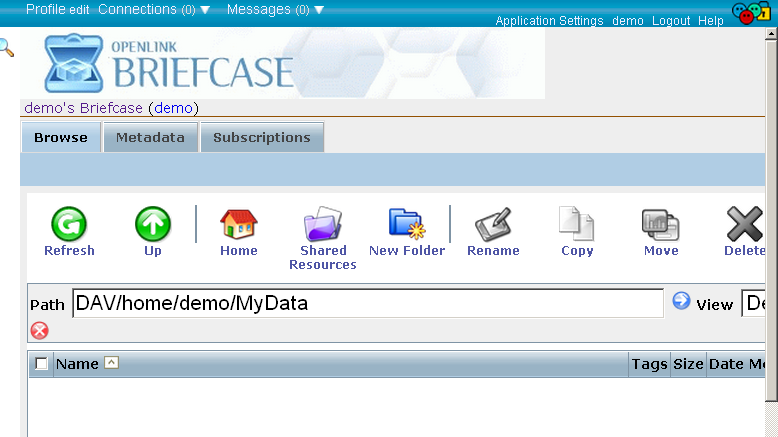
- Click "Create".
- In the presented form:
- Specify "File name", for ex: mytest.n3 ;
- Specify "File Mime Type", for ex: text/rdf+n3 ;
- Enter in the "File Content" text area the following triples:
<http://www.openlinksw.com/dataspace/kidehen@openlinksw.com#this> <http://rdfs.org/sioc/ns#id>  	"kidehen@openlinksw.com" .
<http://www.openlinksw.com/dataspace/kidehen@openlinksw.com#this> <http://rdfs.org/sioc/ns#link> 	<http://www.openlinksw.com/dataspace/kidehen@openlinksw.com> .
<http://www.openlinksw.com/dataspace/kidehen@openlinksw.com#this> <http://rdfs.org/sioc/ns#account_of> 	<http://www.openlinksw.com/dataspace/person/kidehen@openlinksw.com#this> .

- Click "Create".
- Should be created a new file with the name as specified in the form from above:
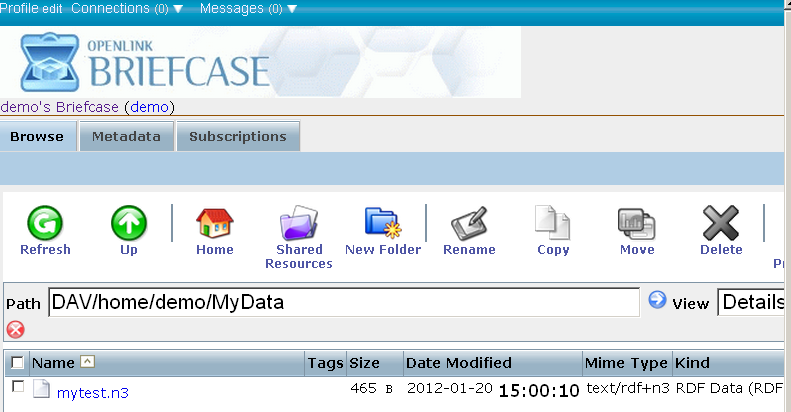
- Now let's check the inserted triples.
Go to your Virtuoso SPARQL endpoint, i.e.,
http://cname/sparqland:- Enter in the Query area the following simple query:
SELECT *
FROM <urn:mydata>
WHERE
  {
    ?s ?p ?o
  }
- Click the button "Run Query"
- As result will be shown the inserted triples:

- Enter in the Query area the following simple query:
Example Using Virtuoso Crawler
The following example is using Virtuoso Crawler which includes the Sponger options so you crawl non-RDF and get RDF and this data will go to the Quad Store.
- Go to conductor UI. For ex. at http://localhost:8890/conductor
- Login as dba user
- Go to tab Web Application Server → Content Management → Content Imports
- Click the "New Target" button
- In the shown form enter set respectively:
- "Crawl Job Name": Tim Berners-Lee's electronic Business Card
- "Data Source Address (URL)": http://www.w3.org/People/Berners-Lee
- "Local WebDAV Identifier" for ex.: /DAV/home/demo/rdf_sink/
- Choose from the list "Local resources owner": demo
- Check the check.box with label "Store metadata".
- Check all the check-boxes shown below the check-box "Store metadata".
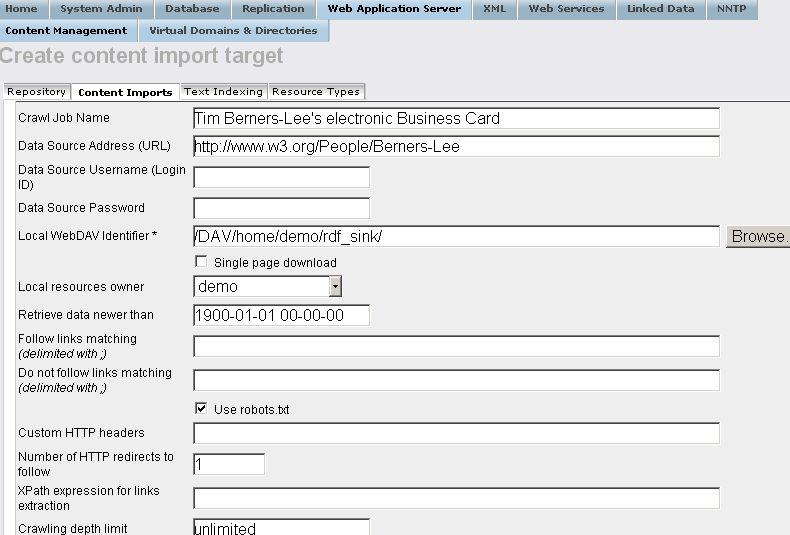
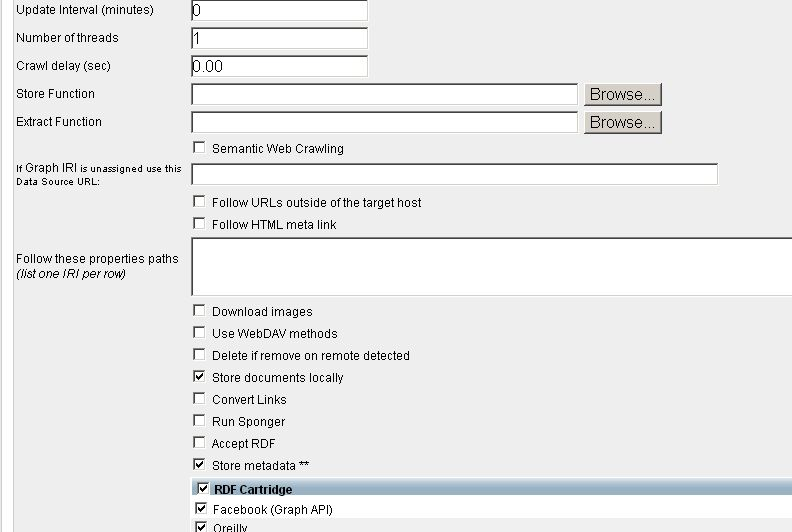
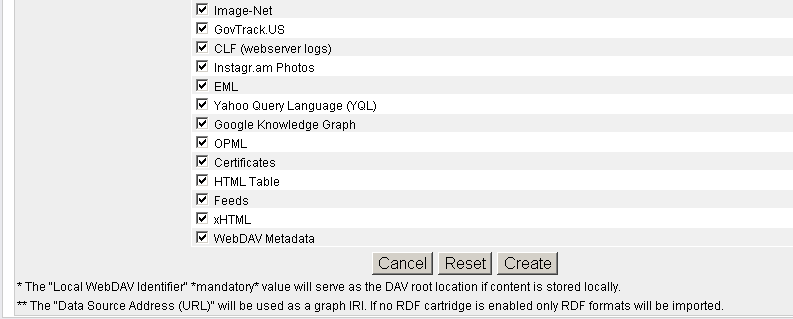
- Click "Create".
- The new created target should be presented in the list of available targets:
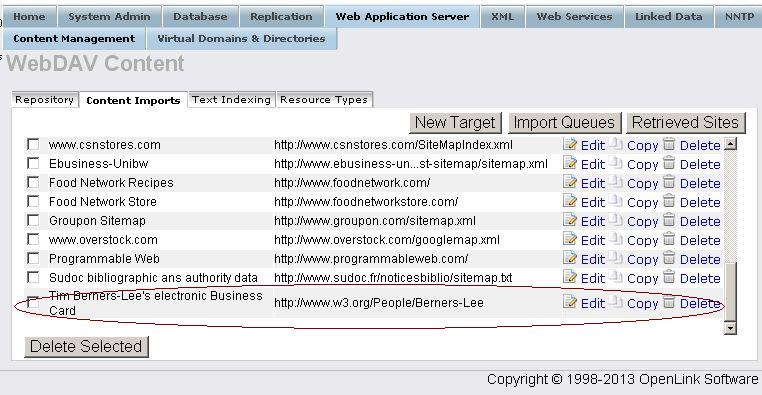
- Click the button "Import Queues".
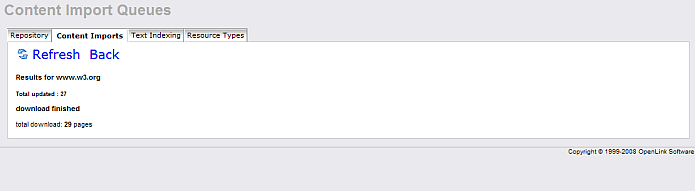
- For "Robot target" with label "Tim Berners-Lee's electronic Business Card" click the start link.
- As result should be shown the number of the pages retrieved.
- Now using the SPARQL endpoint with Sponger option "Use only local data" enter for Default Graph URI: http://www.w3.org/People/Berners-Lee and execute the following query:
SELECT *
WHERE {?s ?p ?o}
- As result should be shown the following triples:
s                                       p                                                  o
http://www.w3.org/People/Berners-Lee    http://www.w3.org/1999/02/22-rdf-syntax-ns#type    http://xmlns.com/foaf/0.1/Document
http://www.w3.org/People/Berners-Lee    http://purl.org/dc/elements/1.1/title              Answers for young people - Tim Berners-Lee
http://www.w3.org/People/Berners-Lee    http://purl.org/dc/elements/1.1/title              Berners-Lee: Weaving the Web
http://www.w3.org/People/Berners-Lee    http://purl.org/dc/elements/1.1/title              Declaration by Tim BL 28 Feb 1996 w.r.t. CDA challenge
http://www.w3.org/People/Berners-Lee    http://purl.org/dc/elements/1.1/title              Errata - Berners-Lee: Weaving the Web
http://www.w3.org/People/Berners-Lee    http://purl.org/dc/elements/1.1/title              Frequently asked questions by the Press - Tim BL
http://www.w3.org/People/Berners-Lee    http://purl.org/dc/elements/1.1/title              Glossary - Weaving the Web - Berners-Lee
http://www.w3.org/People/Berners-Lee    http://purl.org/dc/elements/1.1/title              Longer Bio for Tim Berners-Lee
http://www.w3.org/People/Berners-Lee    http://purl.org/dc/elements/1.1/title              Michael Dertouzos has left us
http://www.w3.org/People/Berners-Lee    http://purl.org/dc/elements/1.1/title              The Future of the Web and Europe
http://www.w3.org/People/Berners-Lee    http://purl.org/dc/elements/1.1/title              The World Wide Web: Past, Present and Future
http://www.w3.org/People/Berners-Lee    http://purl.org/dc/elements/1.1/title              The World Wide Web: A very short personal history
http://www.w3.org/People/Berners-Lee    http://purl.org/dc/elements/1.1/title              Tim Berners-Lee
http://www.w3.org/People/Berners-Lee    http://purl.org/dc/elements/1.1/title              Tim Berners-Lee - 3Com Founders chair
http://www.w3.org/People/Berners-Lee    http://purl.org/dc/elements/1.1/title              Tim Berners-Lee: Disclosures
http://www.w3.org/People/Berners-Lee    http://purl.org/dc/elements/1.1/title              Tim Berners-Lee: WWW and UU and I
http://www.w3.org/People/Berners-Lee    http://purl.org/dc/elements/1.1/title              Tim Berners-Lee: WorldWideWeb, the first Web client
References
Examples using SPARQL 1.1 Graph Store HTTP Protocol
- sparql-graph-crud-auth Endpoint UI Usage Example
- SPARQL 1.1. Graph Store HTTP Protocol cURL Examples Collection
Example using SPARQL Query & Sponger
(i.e. we Sponge the Resources in the FROM Clause or values for the graph-uri parameter in SPARQL protocol URLs)
- Execute the following query:
SPARQL
SELECT ?id
FROM NAMED <http://www.openlinksw.com/dataspace/kidehen@openlinksw.com/weblog/kidehen@openlinksw.com%27s%20BLOG%20%5B127%5D/sioc.ttl>
 OPTION (get:soft "soft", get:method "GET")
WHERE { GRAPH ?g { ?id a ?o } }
LIMIT 10;
- As result will be shown the retrieved triples:
id
VARCHAR
_______________________________________________________________________________

http://www.openlinksw.com/dataspace/kidehen@openlinksw.com#this
http://www.openlinksw.com/dataspace/kidehen@openlinksw.com/weblog/kidehen@openlinksw.com%27s%20BLOG%20%5B127%5D
http://www.openlinksw.com/dataspace/kidehen@openlinksw.com/weblog/kidehen@openlinksw.com%27s%20BLOG%20%5B127%5D
http://www.openlinksw.com/dataspace/person/kidehen@openlinksw.com#this
http://www.openlinksw.com/dataspace/kidehen@openlinksw.com/weblog/kidehen@openlinksw.com%27s%20BLOG%20%5B127%5D/612
http://www.openlinksw.com/dataspace/kidehen@openlinksw.com/weblog/kidehen@openlinksw.com%27s%20BLOG%20%5B127%5D/612
http://www.openlinksw.com/dataspace/kidehen@openlinksw.com/weblog/kidehen@openlinksw.com%27s%20BLOG%20%5B127%5D/610
http://www.openlinksw.com/dataspace/kidehen@openlinksw.com/weblog/kidehen@openlinksw.com%27s%20BLOG%20%5B127%5D/610
http://www.openlinksw.com/dataspace/kidehen@openlinksw.com/weblog/kidehen@openlinksw.com%27s%20BLOG%20%5B127%5D/856
http://www.openlinksw.com/dataspace/kidehen@openlinksw.com/weblog/kidehen@openlinksw.com%27s%20BLOG%20%5B127%5D/856

10 Rows. -- 20 msec.
References
- Virtuoso tutorial for RDF data import using SPARQL sponger.
- SPARQL Query Language support
- SPARQL Protocol support
Example using Virtuoso PL APIs
- In the example script we implement a basic mapper which maps a text/plain mime type to an imaginary ontology, which extends the class Document from FOAF with properties 'txt:
UniqueWords' and 'txt:Chars', where the prefix 'txt:' we specify as 'urn:txt:v0.0:'.
USE DB;

CREATE PROCEDURE DB.DBA.RDF_LOAD_TXT_META
    (
     IN     graph_iri       VARCHAR,
     IN     new_origin_uri  VARCHAR,
     IN     dest            VARCHAR,
     INOUT  ret_body        ANY,
     INOUT  aq              ANY,
     INOUT  ps              ANY,
     INOUT  ser_key         ANY
    )
{
  DECLARE words, chars INT;
  DECLARE vtb, arr, subj, ses, str ANY;
  DECLARE ses ANY;
  -- if any error we just say nothing can be done
  DECLARE EXIT HANDLER FOR SQLSTATE '*'
    {
      RETURN 0;
    };
  subj := COALESCE (dest, new_origin_uri);
  vtb := vt_batch ();
  chars := LENGTH (ret_body);
  -- using the text index procedures we get a list of words
  vt_batch_feed (vtb, ret_body, 1);
  arr := vt_batch_strings_array (vtb);
  -- the list has 'word' and positions array, so we must divide by 2
  words := LENGTH (arr) / 2;
  ses := string_output ();
  -- we compose a N3 literal
  http (sprintf ('<%s> <http://www.w3.org/1999/02/22-rdf-syntax-ns#type> <http://xmlns.com/foaf/0.1/Document> .\n', subj), ses);
  http (sprintf ('<%s> <urn:txt:v0.0:UniqueWords> "%d" .\n', subj, words), ses);
  http (sprintf ('<%s> <urn:txt:v0.0:Chars> "%d" .\n', subj, chars), ses);
  str := string_output_string (ses);
  -- we push the N3 text into the local store
  DB.DBA.TTLP (str, new_origin_uri, subj);
  RETURN 1;
}
;

--
DELETE FROM  DB.DBA.SYS_RDF_MAPPERS  WHERE  RM_HOOK = 'DB.DBA.RDF_LOAD_TXT_META';

INSERT SOFT  DB.DBA.SYS_RDF_MAPPERS (RM_PATTERN, RM_TYPE, RM_HOOK, RM_KEY, RM_DESCRIPTION)
    VALUES ('(text/plain)', 'MIME', 'DB.DBA.RDF_LOAD_TXT_META', null, 'Text Files (demo)');

-- here we set order to some large number so don't break existing mappers
UPDATE  DB.DBA.SYS_RDF_MAPPERS  SET  RM_ID = 2000  WHERE  RM_HOOK = 'DB.DBA.RDF_LOAD_TXT_META';
- To test the mapper we just use /sparql endpoint with option 'Retrieve remote RDF data for all missing source graphs' to execute:
SELECT *
  FROM <http://demo.openlinksw.com:8890/tutorial/hosting/ho_s_30/WebCalendar/tools/summary.txt>
  WHERE { ?s ?p ?o }
- Check the results here.
Important: Setting Sponger Permissions
In order to allow the Sponger to update the local RDF quad store with triples constituting the the Network Resource being fetched as structured data, the role "SPARQL_UPDATE" must be granted to the account "SPARQL". This should normally be the case. If not, you must manually grant this permission. As with most Virtuoso DBA tasks, the Conductor provides the simplest means of doing this.
References
Example using SIMILE RDF Bank API
Virtuoso implements the HTTP-based Semantic Bank API that enables client applications to post to its RDF Triple Store. This method offers an alternative to using Virtuoso/PL functions or WebDAV uploads as the triples-insertion mechanism.- From your machine go to Firefox → Tools →
PiggyBank → My Semantic Bank Accounts - Add in the shown form:
- For bank address: http://demo.openlinksw.com/bank
- For account id: demo
- For password: demo
- Go to demo.openlinksw.com/ods
- Log in as user demo, password: demo
- Go to the Weblog tab from the main ODS Navigation
- Click on weblog instance name, for ex. "demo's Weblog".
- When the weblog home page is loaded, click Alt + P.
- As result is shown the "My
PiggyBank" page with all the collected information presented in items. - For several of the items add Tags from the form "Tag" shown for each of them.
- As result should be shown the message "Last updated: [here goes the date value].
- You can also click "Save" and "Publish" for these items.
- Go to http://demo.openlinksw.com/sparql
- Enter for the "Default Graph URI" field: http://simile.org/piggybank/demo
- Enter for the "Query text" text-area:
   PREFIX rdf: <http://www.w3.org/1999/02/22-rdf-syntax-ns#>
   PREFIX sioc: <http://rdfs.org/sioc/ns#>
   SELECT *
   FROM <http://simile.org/piggybank/demo>
   WHERE {?s ?p  ?o}
- Click "Run Query".
- As results are shown the found results.
References
- Implementation of the SIMILE project's HTTP based Semantic Bank API
- Virtuoso Documentation Semantic Bank end point
Example using RDF NET
SQL> SELECT DB.DBA.HTTP_RDF_NET ('SPARQL LOAD
"http://www.openlinksw.com/dataspace/person/kidehen@openlinksw.com"
INTO GRAPH <http://www.openlinksw.com/>');

callret
VARCHAR
_______________________________________________________

<?xml version="1.0" ?>
<rdf:RDF xmlns:rdf="http://www.w3.org/1999/02/22-rdf-syntax-ns#"
xmlns:vcard="http://www.w3.org/2001/vcard-rdf/3.0#"
xmlns="http://example.org/book/" xmlns:dc="http://purl.org/dc/elements/1.1/"
xmlns:ns="http://example.org/ns#">
<rdf:Description>
<callret-0>LOAD <http://www.openlinksw.com/dataspace/person/kidehen@openlinksw.com>
INTO GRAPH <http://www.openlinksw.com/> -- done</callret-0>
</rdf:Description>
</rdf:RDF>

1 Rows. -- 1982 msec.
See Also
- Evaluator Guide for Linked Data Deployment
- Linked Data Deployment DOAP Tutorial
- More Examples for Create Linked Data Resources using a variety content formats from the RDF family:
- RDF Insert Methods in Virtuoso.
References
CategoryRDF CategoryHowTo CategoryVirtuoso CategorySPARQL