Virtuoso Sponger
Situation Analysis
Recent estimates (circa. March '09) from the Linked Open Data (LOD) community put the size of burgeoning Web of Linked Data at approximately 4.5 billion triples; in reality, this number is much larger due to the fact that the LOD community estimates are basically approximations of the data from the LOD Cloud pictorial which is primarily based on the following Linked Data source types:
- Loads from public RDF dump archives
- Loads from dumps released by crawlers such as PingTheSemanticWeb, Sindice, and Falcons
What these estimates do not cover is the amount of RDF based Linked Data generated "on the fly" by RDF middleware technologies (a/k/a "RDFizers"). Naturally, tracking the count of this form of Web is somewhat mercurial due to the fact that all of the RDFized data isn't necessarily available via a public RDF archive dump.
This white paper covers Virtuoso's in-built RDFizer middleware, popularly known as the "Sponger," a very powerful cross platform solution for generating RDF Linked Data "on the fly". The Sponger exposes its services via the Virtuoso SPARQL Engine, Content Crawler, and a RESTful API.
Other facets of Virtuoso's Linked-Data-related feature set are explored in the accompanying white papers Virtuoso RDF Views - Getting Started Guide and Deploying Linked Data .
Contents
- Contents
- What Is The Sponger?
- Sponger Benefits
- Using The Sponger
- Consuming the Generated RDF Structured Data
- Data Sources Supported by the Sponger
- How Does It Work?
- Sponger Architecture
- Sponger Configuration Using Conductor
- Custom Cartridges
- Custom Resolvers
- Sponger Usage Examples
- RDFa Support - Ingest & Generation
- Appendix A: Ontologies Supported by ODS-Briefcase
- Appendix B: RDF Cartridges VAD Package
- Appendix C: Configuring the Aperture Framework
- Glossary
What Is The Sponger?
Virtuoso includes theSponger, built-in RDF middleware for transforming non-RDF data into RDF "on the fly". Its goal is to use non-RDF Web data sources as input, e.g. (X)HTML Web Pages, (X)HTML Web pages hosting microformats, and even Web services such as those from Google, Del.icio.us, Flickr etc., and create RDF as output. The implication of this facility is that you can use non-RDF data sources as Linked Data Web data sources.
As depicted below, OpenLink's broad portfolio of Linked-Data-aware products supports a number of routes for creating or consuming Linked Data. The Sponger provides a key platform for developers to generate quality data meshes from unstructured or semi-structured data.
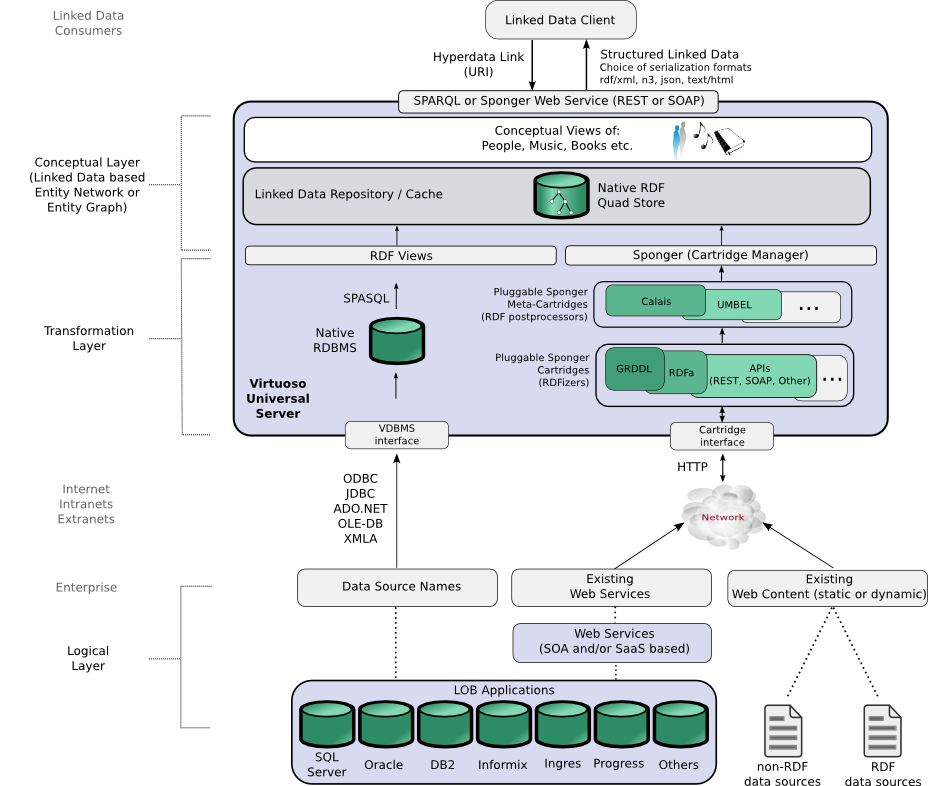
Figure 1: OpenLink Linked Data generation options
Architecturally, the Sponger is comprised of a number of Cartridges which are themselves comprised of a Metadata Extractor and RDF Schema/Ontology Mapper components. Metadata extracted from non-RDF resources is used as the basis for generating structured data by mapping it to a suitable ontology. In Data Objects terms, the job of a cartridge is to extract metadata from Web resources, be they Web pages or Web services, and to make best-effort Data Object description graphs using the extracted metadata.
The Sponger is highly customizable.
Custom cartridges can be developed using any language supported by the Virtuoso Server Extensions API enabling RDF instance data generation from resource types not available in the default Sponger Cartridge collection bundled as a Virtuoso VAD package (cartridges_dav.vad).
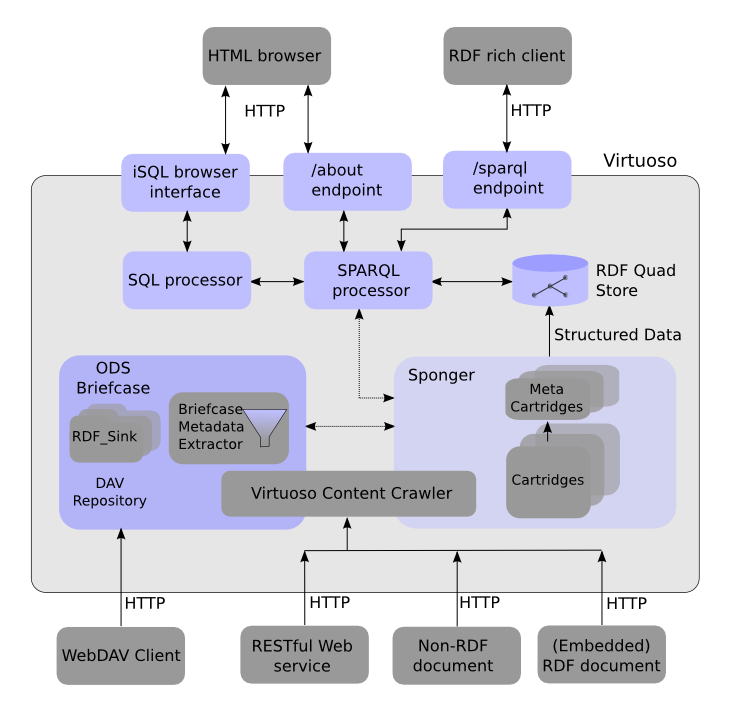
Figure 2: Virtuoso metadata extraction & RDF structured data generation
Sponger Benefits
The Sponger delivers middleware that accelerates the bootstrapping of the Data Web by generating RDF Linked Data from non-RDF data sources, unobtrusively. This "Swiss army knife" for on-the-fly Linked Data generation provides a bridge between the traditional Document Web and the Linked Data Web ("Data Web").
Sponging data from non-RDF Web sources and converting it to RDF exposes the data in a canonical form for querying and inference, and enables fast and easy construction of linked data driven mesh-ups as opposed to code driven Web 2.0 mash-ups.
The RDF extraction and instance data generation products that offer functionality demonstrated by the Sponger are also commonly referred to as RDFizers.
Using The Sponger
The Sponger can be invoked via the following mechanisms:
- Virtuoso SPARQL query processor
- RDF Proxy Service
- OpenLink RDF client applications
- ODS-Briefcase (Virtuoso WebDAV)
- Directly via Virtuoso PL
SPARQL Query Processor
Virtuoso extends the SPARQL Query Language such that it is possible to download RDF resources from a given IRI, parse, and then store the resulting triples in a graph, with all three operations performed during the SPARQL query-execution process. The IRI/URI of the graph used to store the triples is usually equal to the URL where the resources are downloaded from, consequently the feature is known as "IRI/URI dereferencing". If a SPARQL query instructs the SPARQL processor to retrieve the target graph into local storage, then the SPARQL sponger will be invoked.
The SPARQL extensions for IRI dereferencing are described below. Essentially these enable downloading and local storage of selected triples either from one or more named graphs, or based on a proximity search from a starting URI for entities matching the select criteria and also related by the specified predicates, up to a given depth. For full details please refer to the OpenLink Virtuoso Reference Manual , section Linked Data - IRI Dereferencing .
Note: For brevity, any reference to URI/IRIs above or in subsequent sections implies an HTTP URI/IRI, where IRI is an internationalized URI. Similarly, in the context of the Sponger, the term IRI in the Virtuoso reference documentation should be taken to mean an HTTP IRI.
SPARQL Extensions for IRI Dereferencing of FROM Clauses
Virtuoso extends the syntax of the SPARQL "FROM" and "FROM NAMED" clauses.
It allows an additional list of options at the end of both clauses: option ( get: param1 value1, get: param2 value2, ...) , where the names of the allowed parameters are:
-
get:softis the retrieval mode. Supported values are "soft," and "replace" or "replacing".- If the value is "
soft" and the destination graph is already populated (i.e., isn't empty), then the SPARQL processor will not try to retrieve triples. Theget:softoption must be present in order for the otherget:...options to be recognized. - Values "
replace" or "replacing" clear the local graph cache.
- If the value is "
-
get:uriis the IRI to retrieve if it is not equal to the IRI of theFROMclause. This option can be used if the data should be retrieved from a mirror, rather than the original resource location, or in any other case where the destination graph IRI differs from the location of the resource. -
get:methodis the HTTP method which should be used to retrieve the resource. Supported methods are "GET" for plain HTTP, and "MGET" for a URIQA web service endpoint. By default, "MGET" is used for IRIs that end with "/" and "GET" for everything else. -
get:refreshis the maximum allowed age of the locally cached resource, irrespective of what is specified by the server where the resource resides. The option value is a positive integer specifying the maximum age in seconds. Virtuoso reads HTTP headers and uses the "Date," "ETag," "Expires," "Last-Modified," "Cache-Control," and "Pragma: no-cache" fields to calculate when the resource should be reloaded. Theget:refreshoption value can override and reduce this calculated value, but cannot increase it. -
get:proxyis the address (in the form of a "host:port" string) of the proxy server to use if direct download is impossible.
Example:
SPARQL
SELECT ?id
FROM NAMED <http://www.openlinksw.com/dataspace/kidehen@openlinksw.com/weblog/kidehen@openlinksw.com%27s%20BLOG%20%5B127%5D/sioc.ttl>
  OPTION (get:soft "soft", get:method "GET")
FROM NAMED <http://www.openlinksw.com/dataspace/oerling/weblog/Orri%20Erling%27s%20Blog/sioc.ttl>
  OPTION (get:soft "soft", get:method "GET")
WHERE { GRAPH ?g { ?id a ?o } }
LIMIT 10;
If a get:... parameter repeats for every FROM clause, it can be written as a global pragma, so the above query can be rewritten as:
SPARQL
define get:method "GET"
define get:soft "soft"
SELECT ?id
FROM NAMED <http://www.openlinksw.com/dataspace/kidehen@openlinksw.com/weblog/kidehen@openlinksw.com%27s%20BLOG%20%5B127%5D/sioc.ttl>
FROM NAMED <http://www.openlinksw.com/dataspace/oerling/weblog/Orri%20Erling%27s%20Blog/sioc.ttl>
WHERE { GRAPH ?g { ?id a ?o } }
LIMIT 10;
SPARQL Extensions for IRI Dereferencing of Variables
In addition to the "define get:..." SPARQL extensions for IRI dereferencing in FROM clauses, Virtuoso supports dereferencing SPARQL IRIs used in the WHERE clause (graph patterns) of a SPARQL query via a set of "define input:grab-..." pragmas.
Consider an RDF resource which describes a member of a contact list, user1, and also contains statements about other users, user2 anduser3, known to him. Resource user3 in turn contains statements about user4 and so on. If all the data relating to these users were loaded into Virtuoso's RDF database, the query to retrieve the details of all the users could be quite simple. e.g.:
sparql
prefix foaf: <http://xmlns.com/foaf/0.1/>
prefix rdf: <http://www.w3.org/1999/02/22-rdf-syntax-ns#>
select ?id ?firstname ?nick
where
  {
    graph ?g
      {
        ?id rdf:type foaf:Person .
        ?id foaf:firstName ?firstname .
        ?id foaf:knows ?fn .
        ?fn foaf:nick ?nick .
      }
   }
limit 10;
But what if some or all of these resources were not present in Virtuoso's quad store? The highly distributed nature of the Linked Data Web makes it highly likely that these interlinked resources would be spread across several data spaces.
Virtuoso's "input:grab-..." extensions to SPARQL enable IRI dereferencing in such a way that all appropriate resources are loaded (i.e., "fetched") during query execution, even if some of the resources are not known beforehand.
For any particular resource matched, and if necessary downloaded, by the query, it is possible to download related resources via a designated predicate path(s) to a specifiable depth (i.e., number of 'hops', distance, or degrees of separation [i.e., compute Transitive Closures in SPARQL]).
Using Virtuoso's 'input:grab-' pragmas to enable sponging, the above query might be recast to:
sparql
define input:grab-var "?more"
define input:grab-depth 10
define input:grab-limit 100
define input:grab-base "http://www.openlinksw.com/dataspace/kidehen@openlinksw.com/weblog/kidehen@openlinksw.com%27s%20BLOG%20%5B127%5D/1300"
prefix foaf: <http://xmlns.com/foaf/0.1/>
prefix rdf: <http://www.w3.org/1999/02/22-rdf-syntax-ns#>
prefix rdfs: <http://www.w3.org/2000/01/rdf-schema#>

select ?id ?firstname ?nick
where {
    graph ?g {
               ?id rdf:type foaf:Person .
               ?id foaf:firstName ?firstname .
               ?id foaf:knows ?fn .
               ?fn foaf:nick ?nick .
               optional { ?id rdfs:SeeAlso ?more }
            }
}
limit 10;
Another example showing a designated predicate traversal path via the input:grab-seealso extension is:
sparql
define input:grab-iri <http://www.openlinksw.com/dataspace/kidehen@openlinksw.com/weblog/kidehen@openlinksw.com%27s%20BLOG%20%5B127%5D/sioc.ttl>
define input:grab-var "id"
define input:grab-depth 10
define input:grab-limit 100
define input:grab-base "http://www.openlinksw.com/dataspace/kidehen@openlinksw.com/weblog/kidehen@openlinksw.com%27s%20BLOG%20%5B127%5D/1300"
define input:grab-seealso <foaf:maker>
prefix foaf: <http://xmlns.com/foaf/0.1/>

select ?id
where
  {
    graph ?g
      {
        ?id a foaf:Person .
      }
  }
limit 10;
A summary of the input:grab pragmas is given below. Again, for full details please refer to the Virtuoso Reference Manual .
- input:grab-var specifies the name of the SPARQL variable whose values should be used as IRIs of resources that should be downloaded.
- input:grab-iri specifies an IRI that should be retrieved before executing the rest of the query, if it is not in the quad store already. (This pragma can be included multiple times).
- input:grab-seealso (or its synonym input:grab-follow-predicate) specifies a predicate IRI to be used when traversing a graph. (This pragma can be included multiple times).
- input:grab-limit sets the maximum number of resources (graph subject or object nodes) to be retrieved from a target graph.
- input:grab-depth sets the maximum 'degrees of separation' or links (predicates) between nodes in the target graph.
- input:grab-all "yes" instructs the SPARQL processor to dereference everything related to the query. All variables and literal IRIs in the query become values for input:grab-var and input:grab-iri. The resulting performance may be very bad.
- input:grab-base specifies the base IRI to use when converting relative IRIs to absolute. (Default: empty string).
- input:grab-destination overrides the default IRI dereferencing and forces all retrieved triples to be stored in the specified graph.
- input:grab-loader identifies the procedure used to retrieve each resource via HTTP, parse and store it. (Default: DB.DBA.RDF_SPONGE_UP)
-
input:grab-resolver identifies the procedure that resolves IRIs and determines the HTTP method of retrieval.
(Default:
DB.DBA.RDF_GRAB_RESOLVER_DEFAULT)
RDF Proxy Service
Sponger functionality is also exposed via Virtuoso's proxy service endpoints (/about/html/<uri> or /about/rdf/<uri>), which provide an in-built REST style Web service available in any Virtuoso standard installation. The Sponger proxies convert a web resource into RDF by taking a target URL and either returning the content "as is" or transforming (by sponging) to RDF. The extracted RDF is then returned directly, if requested via '/about/rdf', or rendered as HTML, if requested via '/about/html'. Thus, the proxy service can be used as a 'pipe' for RDF browsers to browse non-RDF sources.
When the cartridges package is installed, Virtuoso reserves the paths '/about/rdf/' and '/about/html/' for the RDF proxy service. For example, if a Virtuoso installation on host example.com listens for HTTP requests on port 8890, then client applications should use a 'service endpoint' string equal to 'http://example.com:8890/about/rdf' or 'http://example.com:8890/about/html'. If the cartridges package is not installed, then the service uses the path '/proxy/rdf/'. (Note: The old RDF proxy service pattern '/proxy/' is now deprecated.)
Example:
The following URLs return information about musician John Cale, gleaned from the MusicBrainz music metadatabase, rendered as RDF or HTML respectively.
- http://demo.openlinksw.com/about/rdf/http://musicbrainz.org/artist/72c090b6-a68e-4cb9-b330-85278681a714.html
- http://demo.openlinksw.com/about/html/http://musicbrainz.org/artist/72c090b6-a68e-4cb9-b330-85278681a714.html
The results of pasting each URL into a browser are shown below.
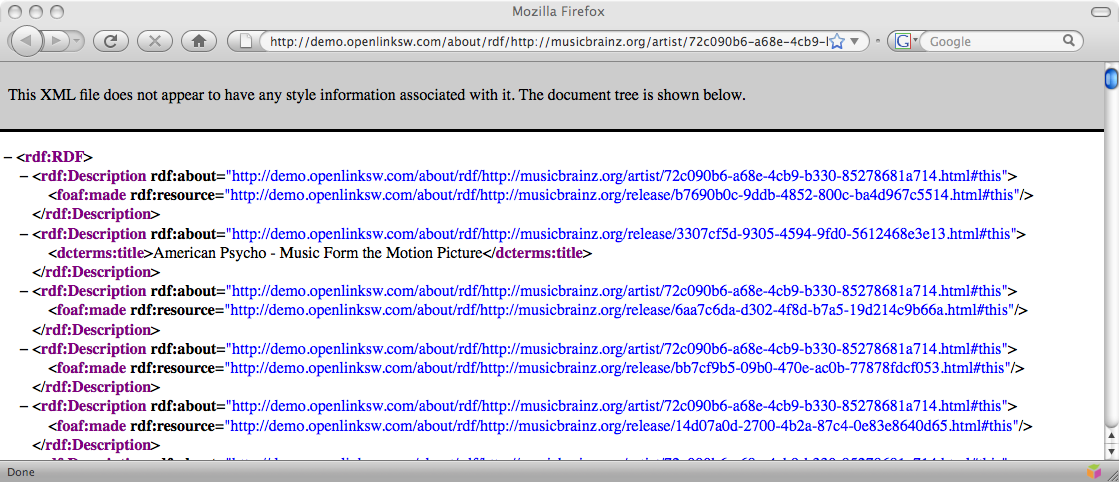
Figure 3: Fetched RDF data returned by the /about/rdf proxy
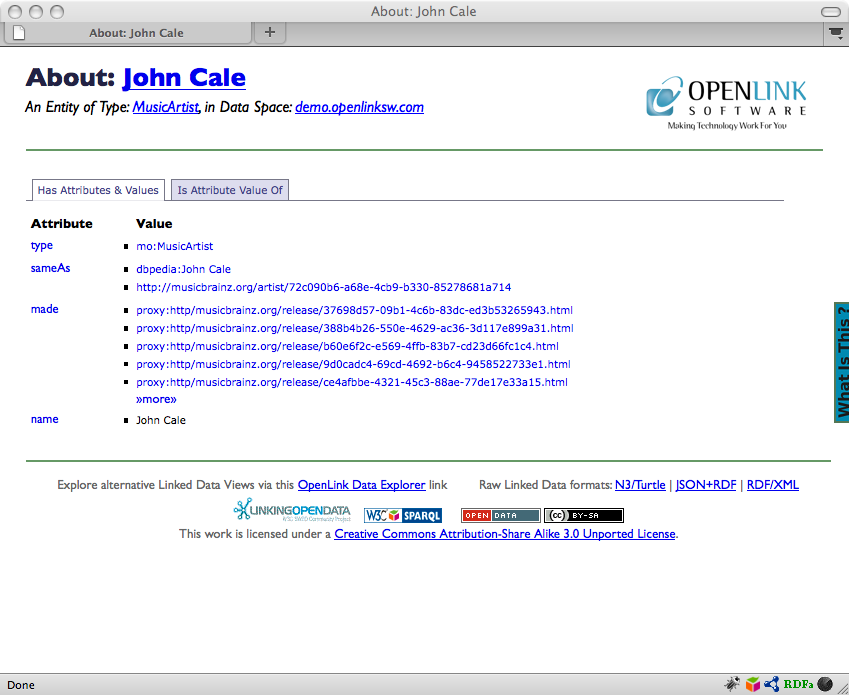
Figure 4: Fetched RDF data returned by the /about/html proxy
The HTML rendering is provided by description.vsp, a Virtuoso Server Page (Virtuoso's equivalent of ASP) which is invoked by the /about/html proxy. Description.vsp underpins the 'Page Description' facility (menu option 'View Page MetaData?') in the OpenLink Data Explorer (see below). Whilst the simple HTML representation is adequate for many purposes, clearly the raw RDF returned by the /about/rdf or /about/id proxies is unlikely to be consumed in this way. The primary aim of the Sponger proxies is to provide a building block for RDF-aware client applications to request and consume the fetched RDF metadata.
New Proxy URI Formats (Sept 09)
As of September 2009, the Sponger proxy paths /about/html and /about/rdf have been augmented to support a richer slash URI scheme for identifying an entity and its metadata in a variety of representation formats.
The proxy path /about/html returns an XHTML description of an entity as before, but now includes richer embedded RDFa. Although some of the examples in this document still refer to /about/rdf (which is still usable), please bear in mind that this path has been deprecated in favor of /about/id.
The new proxy path /about/id returns an RDF description of an entity, using a default serialization format of RDF/XML. Different serialization formats can be requested by specifying the appropriate media type in an Accept header. Supported alternative formats are N3, Turtle (TTL) or NTriples. Alternatively, rather than using /about/id in combination with an Accept header specifying a media type, it is also possible to request a serialization format directly using another new proxy path /about/data. In this case, no Accept header is required as the required format is specified as part of the request URL.
To dereference the description of a Web-addressable resource via your browser simply type in one of the following URL patterns:
- HTML description - http://<sponger proxy host>/about/html/<URLscheme>/<hostname>/<localpart>
- RDF description - http://<sponger proxy host>/about/data/<format>/<URLscheme>/<hostname>/<localpart> where format is one of xml, n3, nt, ttl or json.
Examples
The examples which follow, illustrating how RDF metadata about a product described at www.bestbuy.com can be requested in different formats, use a public Virtuoso Sponger service hosted at linkeddata.uriburner.com. For more information refer to the URIBurner Wiki.
Notice how requests to /about/id are redirected to /about/html, /about/data/nt, /about/data/xml or /about/data/json depending on the requested format. The required URL rewriting rules are preconfigured when the cartridges VAD is installed.
HTML+RDFa based metadata
curl -I -H "Accept: text/html" "http://linkeddata.uriburner.com/about/id/http/www.bestbuy.com/site/olspage.jsp?skuId=9491935&type=product&id=1218115079278"

HTTP/1.1 303 See Other
Server: Virtuoso/05.11.3040 (Solaris) x86_64-sun-solaris2.10-64  VDB
Connection: close
Content-Type: text/html; charset=ISO-8859-1
Date: Tue, 01 Sep 2009 21:41:52 GMT
Accept-Ranges: bytes
Location: http://linkeddata.uriburner.com/about/html/http/www.bestbuy.com/site/olspage.jsp?skuId=9491935&type=product&id=1218115079278
Content-Length: 13
or
curl -I -H "Accept: application/xhtml+xml" "http://linkeddata.uriburner.com/about/id/http/www.bestbuy.com/site/olspage.jsp?skuId=9491935&type=product&id=1218115079278"

HTTP/1.1 303 See Other
Server: Virtuoso/05.11.3040 (Solaris) x86_64-sun-solaris2.10-64  VDB
Connection: close
Content-Type: text/html; charset=ISO-8859-1
Date: Thu, 03 Sep 2009 14:33:45 GMT
Accept-Ranges: bytes
Location: http://linkeddata.uriburner.com/about/html/http/www.bestbuycom/site/olspage.jsp?skuId=9491935&type=product&id=1218115079278
Content-Length: 13
N3 based metadata
curl -I -H "Accept: text/n3" "http://linkeddata.uriburner.com/about/id/http/www.bestbuy.com/site/olspage.jsp?skuId=9491935&type=product&id=1218115079278"

HTTP/1.1 303 See Other
Server: Virtuoso/05.11.3040 (Solaris) x86_64-sun-solaris2.10-64  VDB
Connection: close
Date: Tue, 01 Sep 2009 21:38:44 GMT
Accept-Ranges: bytes
TCN: choice
Vary: negotiate,accept
Content-Location: /about/data/nt/http/www.bestbuy.com/site/olspage.jsp?skuId=9491935%26type=product%26id=1218115079278
Content-Type: text/n3; qs=0.8
Location: http://linkeddata.uriburner.com/about/data/nt/http/www.bestbuy.com/site/olspage.jsp?skuId=9491935%26type=product%26id=1218115079278
Content-Length: 13
RDF/XML based metadata
curl -I -H "Accept: application/rdf+xml" "http://linkeddata.uriburner.com/about/id/http/www.bestbuy.com/site/olspage.jsp?skuId=9491935&type=product&id=1218115079278"

HTTP/1.1 303 See Other
Server: Virtuoso/05.11.3040 (Solaris) x86_64-sun-solaris2.10-64  VDB
Connection: close
Date: Tue, 01 Sep 2009 21:33:23 GMT
Accept-Ranges: bytes
TCN: choice
Vary: negotiate,accept
Content-Location: /about/data/xml/http/www.bestbuy.com/site/olspage.jsp?skuId=9491935%26type=product%26id=1218115079278
Content-Type: application/rdf+xml; qs=0.95
Location: http://linkeddata.uriburner.com/about/data/xml/http/www.bestbuy.com/site/olspage.jsp?skuId=9491935%26type=product%26id=1218115079278
Content-Length: 13
JSON based metadata
curl -I -H "Accept: application/rdf+json" "http://linkeddata.uriburner.com/about/id/http/www.bestbuycom/site/olspage.jsp?skuId=9491935&type=product&id=1218115079278"

HTTP/1.1 303 See Other
Server: Virtuoso/05.11.3040 (Solaris) x86_64-sun-solaris2.10-64  VDB
Connection: close
Date: Tue, 01 Sep 2009 11:22:52 GMT
Accept-Ranges: bytes
TCN: choice
Vary: negotiate,accept
Content-Location: /about/data/json/http/www.bestbuycom/site/olspage.jsp?skuId=9491935%26type=product%26id=1218115079278
Content-Type: application/rdf+json; qs=0.7
Location: http://linkeddata.uriburner.com/about/data/json/http/www.bestbuycom/site/olspage.jsp?skuId=9491935%26type=product%26id=1218115079278
Content-Length: 13
OpenLink RDF Client Applications
OpenLink currently provides two main RDF client applications
ODE is a Linked Data explorer packaged as a Firefox plugin (support for other browsers is planned). iSPARQL is an interactive AJAX-based SPARQL query builder with support for SPARQL QBE, bundled as part of the OpenLink Ajax Toolkit (OAT). Both RIA clients utilize sponging extensively.
The ODE plugin is dual faceted - RDF data can be viewed and explored natively, through its integral RDF browser, or, as described above, rendered as HTML through ODE's 'View Page Metadata' option. The screenshots below show ODE's RDF browser being launched through the 'View Linked Data Sources' popup menu.
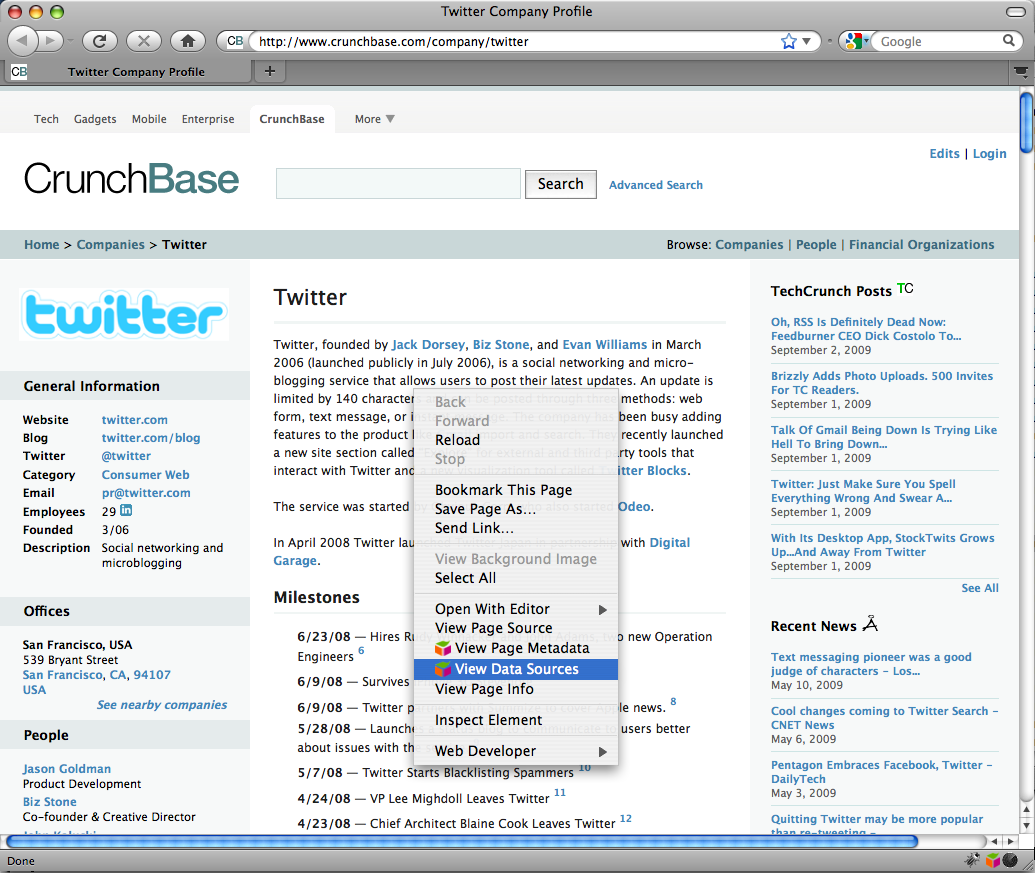
Figure 5: Launching ODE's RDF browser
The RDF browser then displays Network Resource RDF data being fetched via the Crunchbase cartridge.
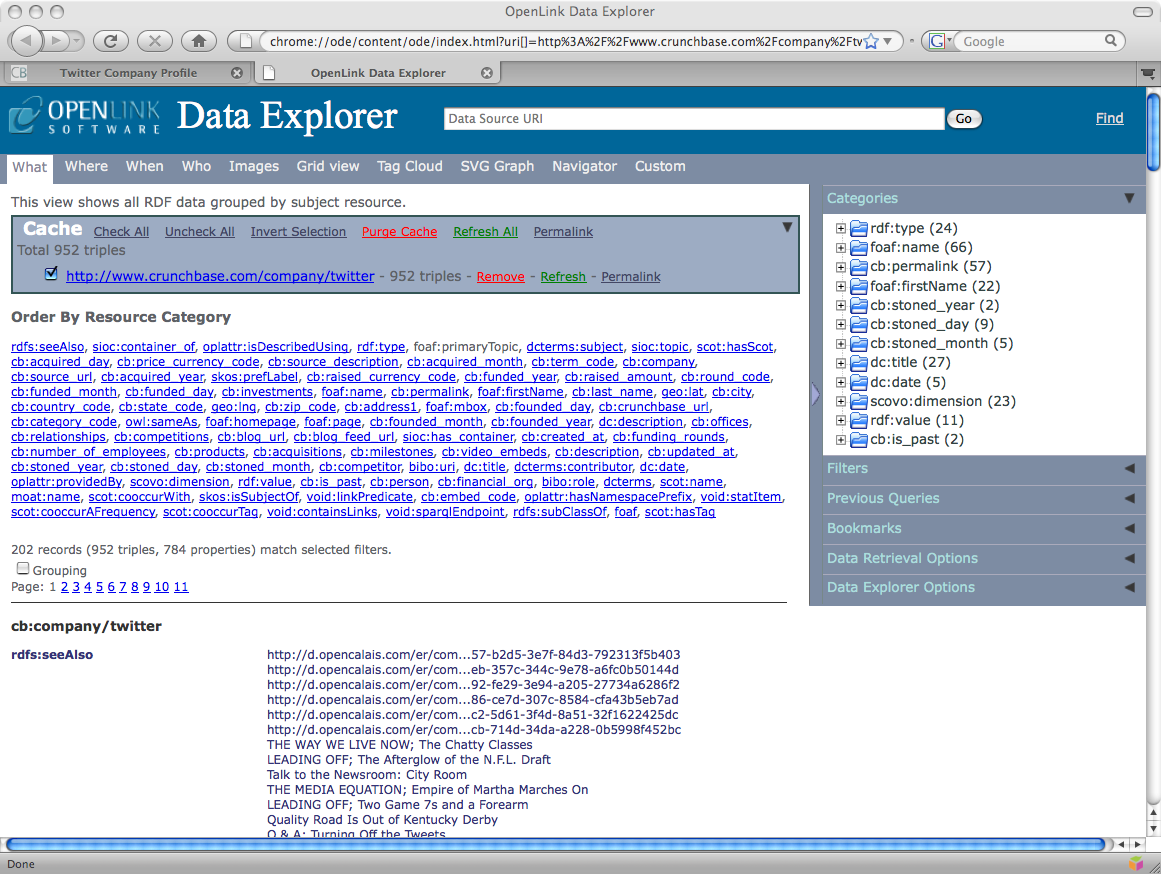
Figure 6: ODE RDF browser displaying Network Resource Crunchbase fetched data.
iSPARQL directs queries to the configured SPARQL endpoint. When targeting a Virtuoso /SPARQL service, Virtuoso specific sponging options can be enabled through the 'Preferences' dialog box.
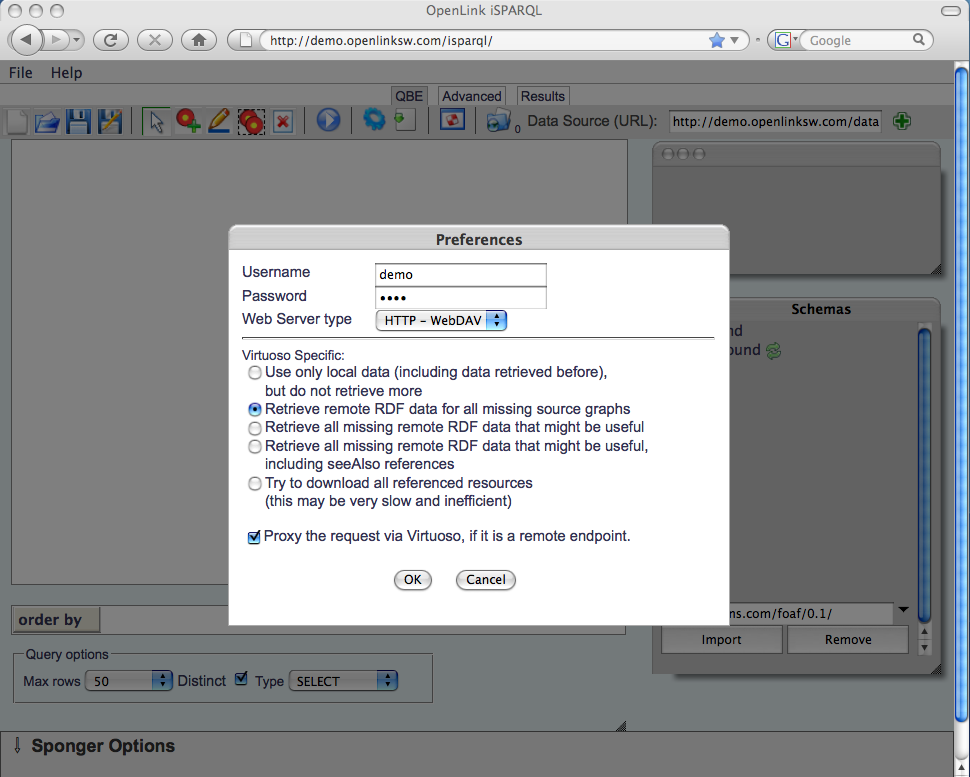
Figure 7: iSPARQL sponging options
The iSPARQL sponger settings are appended to SPARQL queries through the 'should-sponge' query parameter.
These are translated to IRI dereferencing pragmas on the server as follows:
| iSPARQL sponging setting |
/sparql endpoint: "should-sponge" query parameter value
|
SPARQL processor directives |
| Use only local data | N/A | N/A |
| Retrieve remote RDF data for all missing source graphs | soft
|
define get:soft "soft"
|
| Retrieve all missing remote RDF data that might be useful | grab-all
|
define input:grab-all "yes"
|
| Retrieve all missing remote RDF data that might be useful including seeAlso references | grab-seealso
|
define input:grab-all "yes" |
| Try to download all referenced resources | grab-everything
|
define input:grab-all "yes"
|
ODS-Briefcase (Virtuoso WebDAV)
ODS-Briefcase is a component of OpenLink Data Spaces (ODS), a new generation distributed collaborative application platform for creating Semantic Web presence via Data Spaces derived from weblogs, wikis, feed aggregators, photo galleries, shared bookmarks, discussion forums and more. It is also a high level interface to the Virtuoso WebDAV repository.
ODS-Briefcase offers file-sharing functionality that includes the following features:
- Web browser-based interactions
- Web Services (direct use of the HTTP based WebDAV protocol)
- SPARQL query language support - all WebDAV resources are exposed as SIOC ontology instance data (RDF data sets)
When resources or documents are put into the ODS Briefcase and are made publicly readable (via a Unix-style +r permission or ACL setting) and the resource in question is of a supported content type, metadata is automatically extracted at file upload time.
Note :ODS-Briefcase extracts metadata from a wide array of file formats, automatically.
The extracted metadata is available in two forms, pure WebDAV and RDF (with RDF/XML or N3/Turtle serialization options), that is optionally synchronized with the underlying Virtuoso Quad Store.
All public readable resources in WebDAV have their owner, creation time, update time, size and tags published, plus associated content type dependent metadata. This WebDAV metadata is also available in RDF form as a SPARQL queryable graph accessible via the SPARQL protocol endpoint using the WebDAV location as the RDF data set URI (graph or data source URI).
You can also use a special RDF_Sink folder to automate the process of uploading RDF resources files into the Virtuoso Quad Store via WebDAV or raw HTTP. The properties of the special folder control whether sponging (RDFization) occurs. Of course, by default, this feature is enabled across all Virtuoso and ODS installations (with an ODS-Briefcase Data Space instance enabled).
Raw HTTP Example using CURL:
Username: demo
Password: demo
Source File: wine.rdf
Destination Folder:
http://demo.openlinksw.com/DAV/home/demo/rdf_sink/
Content Type: application/rdf+xml

$ curl -v -T wine.rdf -H content-type:application/rdf+xml http://demo.openlinksw.com/DAV/home/demo/rdf_sink/ -u demo:demo
Finally, you can also get RDF data into Virtuoso's Quad Store via WebDAV using the Virtuoso Web Crawler utility (configurable via the Virtuoso Conductor UI). This feature also provides the ability to enable or disable Sponging as depicted below.
Sponger and ODS-Briefcase Structured Data Extractor Interrelationship
As the Sponger and ODS-Briefcase both extract structured data, what is the relationship between these two facilities?
The principal difference between the two is that the Sponger is anRDF data crawler & generator , whereas Briefcase's structured data extractor is a WebDAV resourcefilter . The Briefcase structured data extractor is aimed at providing RDF data from WebDAV resources. Thus, if none of the available Sponger cartridges are able to extract metadata and produce RDF structured data, the Sponger calls upon the Briefcase extractor as the last resort in the RDF structured data generation pipeline.
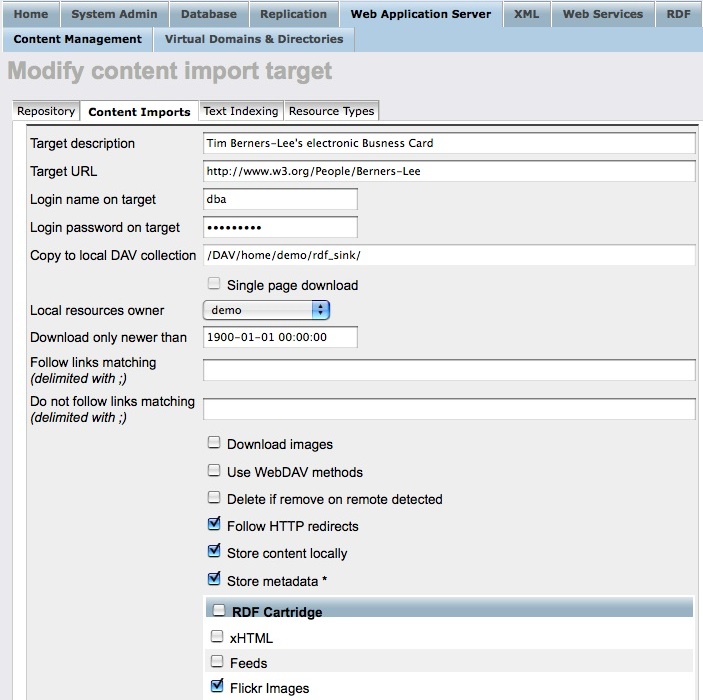

Figure 8: Conductor's content import configuration panel
Directly via Virtuoso PL
Sponger cartridges are invoked through a cartridge hook which provides a Virtuoso PL entry point to the packaged functionality. Should you wish to utilize the Sponger from your own Virtuoso PL procedures, you can do so by calling these hook routines directly. Full details of the hook function prototype and how to define your own cartridges are presented later in this document.
Consuming the Generated RDF Structured Data
The generated RDF-based structured data (RDF) can be consumed in a number of ways, depending on whether or not the data is persisted in Virtuoso's RDF Quad Store.
If the data is persisted, it can be queried through the Virtuoso SPARQL endpoint associated with any Virtuoso instance: /sparql. The RDF is exposed in a graph typically identified using a URL matching the source resource URL from which the RDF data was generated. Naturally, any SQL query can also access this, since SPARQL can be freely intermixed with SQL via Virtuoso's SPASQL (SPARQL inside SQL) functionality. RDF data is also accessible through Virtuoso's implementation of the URIQA protocol.
If not persisted, as is the case with the RDF Proxy Service, the data can be consumed by an RDF aware Web client, e.g. an RDF browser such as the OpenLink Data Explorer (ODE).
Data Sources Supported by the Sponger
- RDF, including N3 or Turtle: automatically recognized ontologies include:
- SIOC, SKOS, FOAF, AtomOWL, Annotea, Music Ontology, Bibliograhic Ontology, EXIF, vCard, and others
- (X)HTML pages
- HTML header metadata tags: Dublin Core
- Embedded microformats: eRDF, RDFa, hCard, hCalendar, XFN and xFolk
- Syndication Formats
- RSS 2.0
- Atom
- OPML
- OCS
- XBEL (for bookmarks)
- GRDDL
- REST-style Web Service APIs: Google Base, Flickr, Del.icio.us, Ning, Amazon, eBay, Freebase, Facebook, Slideshare, Wikipedia, Musicbrainz, YouTube?, FriendFeed?, CrunchBase?, Digg, raw HTTP etc.
- Files: A multitude of built-in extractors are available for a variety of file formats and MIME types including:
- Binary files: MS Office, OpenOffice?, Open Document Format, images, audio, video etc.
- Web services contract files: (BPEL, WSDL), XBRL, XBEL
- Data exchange formats: iCalendar, vCard
- Virtuoso VADs
- OpenLink licence files
- Third party metadata extraction frameworks: Aperture, Spotlight and SIMILE RDFizers
How Does It Work?
Metadata Extraction
When an RDF aware client requests data from a network accessible resource via the Sponger the following events occur:
- A request is made for data in RDF form (explicitly via Content Negotiation using HTTP Accept Headers), and if RDF is returned nothing further happens.
- If RDF isn't returned, the Sponger passes the data through a Metadata Extraction Pipeline (using Metadata Extractors).
- The extracted data is transformed into RDF via a Mapping Pipeline . RDF entities (instance data) are generated by way of ontology matching and mapping.
- RDF instance data (aka. RDF Structured Linked Data) are returned to the client.
Extraction Pipeline
Depending on the file or format type detected at ingest, the Sponger applies the appropriate metadata extractor. Detection occurs at the time of content negotiation instigated by the retrieval user agent. The normal metadata extraction pipeline processing is follows:
- The Sponger tries to get RDF data (including N3 or Turtle) directly from the dereferenced URL. If it finds some, it returns it, otherwise, it continues.
- If the URL refers to a HTML file, the Sponger tries to find "link" elements referring to RDF documents. If it finds one or more of them, it adds their triples into a temporary RDF graph and continues its processing.
- The Sponger then scans for microformats markup or GRDDL profile URIs. If either is found, RDF triples are generated and added to a temporary RDF graph before continuing.
- If the Sponger finds eRDF or RDFa data in the HTML file, it extracts it from the HTML file and inserts it into the RDF graph before continuing.
- If the Sponger finds it is talking to a web service such as Google Base, it maps the API of the web service with an ontology, creates triples from that mapping and inserts the triples into the temporary RDF graph.
- The next fallback is scanning of the HTML header for different Web 2.0 types or RSS 1.1, RSS 2.0, Atom, etc.
- Failing those tests, the scan then uses standard Web 1.0 rules to search in the header tags for metadata (typically Dublin Core) and transforms them to RDF and again adds them to the temporary graph. Other HTTP response header data may also be transformed to RDF.
- If nothing has been retrieved at this point, the Briefcase metadata extractor is tried.
- Finally, if nothing is found, the Sponger will return an empty graph (should the HTTP cartridge be disabled).
Mapping to Ontologies
RDF generation is done on the fly either using built-in XSLT processors, or in the case of GRDDL, the associated XSLT (exposed via Profile URIs) and local or remote XSLT processors. The RDF generation performed by the Mapping Pipeline is based on an internal mapping table which associates the source data's type with schemas and ontologies. This mapping will vary depending on if you are using Virtuoso with or without the ODS layer. If the ODS application layer (meaning the ODS-Framework and the ODS-Briefcase Data Space application at the very least) is present, the Sponger performs additional mapping using SIOC , SKOS , FOAF , AtomOWL, Annotea bookmarks, Annotea annotations, EXIF , and other ontologies depending on the source data.
The number of ontologies handled by the Sponger is being increased constantly. To identify which ontologies are supported, view the Conductor's RDF Cartridges configuration panel as described later. For details of how to determine the full ontology set supported by Briefcase, refer to Appendix A.
SIOC as a Data Space Glue Ontology
ODS has its own built-in cartridges for the SIOC ontology which it uses as a data space "glue" ontology. SIOC provides a generic data model of containers, items, item types, and associations between items. The actual classes defined by SIOC include: User, UserGroup?, Role, Site, Forum and Post. A separate SIOC types module (sioc-t) extends the SIOC Core ontology by defining additional super-classes, sub-classes and sub-properties to the original SIOC terms. Subclasses include: AddressBook, BookmarkFolder, Briefcase, EventCalendar, ImageGallery, Wiki, Weblog, BlogPost, Wiki plus many others. Within this generic model, SIOC permits the use of other ontologies (FOAF etc.) in describing attributes of SIOC entities that provide sound conceptual partitioning of data spaces that expose RDF Linked Data. Superclasses include: Container (a generic container of Items) and Space (Data Spaces). Thus, it's safe to say that SIOC delivers a generic wrapper, or "glue", ontology for integrating structured RDF data from a myriad of heterogeneous web accessible data sources.
All the data containers (briefcases, blogs, wikis, discussions etc.) maintained by the various ODS application realms (Data Spaces) describe and expose their data as SIOC instance data. The ODS SIOC Reference Guide details the SIOC mappings for each ODS application component (ODS-Framework, ODS-Weblog, ODS-Briefcase, ODS-Feed-Manager, ODS-Wiki, ODS-Mail, ODS-Calendar, ODS-Bookmark-Manager, ODS-Gallery, ODS-Polls, ODS-Addressbook, ODS-Discussion and ODS-Community). Example SPARQL queries for interacting with the SIOC instance data are also shown. In the context of the Sponger, the SIOC mappings used by ODS-Briefcase are some of the most powerful aspects of ODS as a whole (i.e. delivering a platform independent and web architecture based variant of Mac OS X's Spotlight functionality).
Proxy Service Caching
When the Proxy Service is invoked by a user agent, the Sponger caches the imported data in temporary Virtuoso storage. The cache's invalidation rules conform to those of traditional Web browsers. The data expiration time is determined based on subsequent data fetches of the same resource. The first data retrieval records the 'expires' header. On subsequent fetches, the current time is compared to the expiration time stored in the local cache. If HTTP 'expires' header data isn't returned by the source data server, the Sponger will derive its own expiration time by evaluating the 'date' header and 'last-modified' HTTP headers. The cache can be forcefully cleared using the SPARQL extensions get:soft "replace" or get:soft "replacing", as described earlier in the section "SPARQL Extensions for IRI Dereferencing".
Sponger Architecture
As described earlier and illustrated below, the Sponger is comprised of cartridges which are themselves comprised of metadata extractors and ontology mappers. A cartridge is invoked through its cartridge hook, a Virtuoso PL procedure entry point and binding to the cartridge's metadata extractor and ontology mapper.
Metadata Extractors
Metadata extractors perform the initial data extraction operations against data sources that include: (X)HTML documents, XML based syndication formats (RSS, Atom, OPML, OCS etc.), binary files, REST style Web services and Microformats (non GRDDL, GRDDL, eRDF, and RDFa). Each metadata extractor is aligned to at least one ontology mapper.
Metadata extractors are built using Virtuoso PL, C/C++, Java or any other external language supported by Virtuoso's Server Extension API. Of course, Virtuoso's own metadata extractors are written in Virtuoso PL. Third party extractors can be harnessed through the external language support, examples being XMP and Spotlight (both C/C++ based), Aperture (Java based), and SIMILE RDFizers (also Java based).
Ontology Mappers
Sponger ontology mappers perform the the task of generating RDF instance data from extracted metadata (non-RDF) using ontologies associated with a given data source type. They are typically XSLT (using GRDDL or an in-built Virtuoso mapping scheme) or Virtuoso PL based. Virtuoso comes preconfigured with a large range of ontology mappers contained in one or more Sponger cartridges. Nevertheless you are free to create and add your own cartridges, ontology mappers, or metadata extractors.
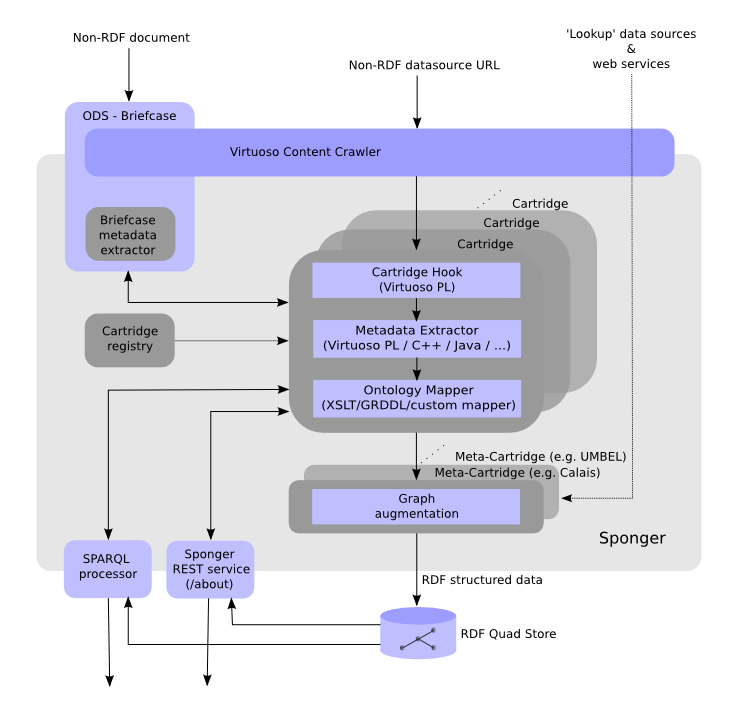
Figure 9: Sponger architecture
Below is an extract from the stylesheet /DAV/VAD/cartridges/xslt/main/flickr2rdf.xsl, used for extracting metadata from Flickr images. Here, the template combines RDF metadata extraction and ontology mapping based on the FOAF and Dublin Core ontologies.
  <xsl:template match="owner">
  <rdf:Description rdf:nodeID="person">
  <rdf:type rdf:resource="http://xmlns.com/foaf/0.1/#Person" />
  <xsl:if test="@realname != ''">
  <foaf:name><xsl:value-of select="@realname"/></foaf:name>
  </xsl:if>
  <foaf:nick><xsl:value-of select="@username"/></foaf:nick>
  </rdf:Description>
  </xsl:template>
  <xsl:template match="photo">
  <rdf:Description rdf:about="{$baseUri}">
  <rdf:type rdf:resource="http://www.w3.org/2003/12/exif/ns/IFD"/>
  <xsl:variable name="lic" select="@license"/>
  <dc:creator rdf:nodeID="person" />
  ...
Cartridge Registry
Once a Sponger cartridge has been developed it must be plugged into the SPARQL engine by registering it in the Cartridge Registry, i.e. by adding a record in the table DB.DBA.SYS_RDF_MAPPERS, either manually via DML, or more easily through Conductor (Virtuoso's browser-based administration console), which provides a UI for adding your own cartridges. Sponger configuration using Conductor is described in detail later. For the moment, we'll focus on outlining the broad architecture of the Sponger.
The SYS_RDF_MAPPERS table definition is as follows:
create table DB.DBA.SYS_RDF_MAPPERS (
  RM_ID integer identity,         -- cartridge ID, designate order of execution
  RM_PATTERN varchar,             -- a REGEX pattern to match URL or MIME type
  RM_TYPE varchar default 'MIME', -- which property of the current resource to match: MIME or URL
  RM_HOOK varchar,                -- fully qualified PL function name e.g. DB.DBA.MY_CARTRIDGE_FUNCTION
  RM_KEY  long varchar,           -- API specific key to use
  RM_DESCRIPTION long varchar,    -- Cartridge description (free text)
  RM_ENABLED integer default 1,   -- 0 or 1 integer flag to include or exclude the given cartridge from Sponger processing chain
  RM_OPTIONS any,                 -- cartridge specific options
  RM_PID integer identity,        -- for internal use only
  primary key (RM_HOOK)
  );
Cartridge Invocation
The Virtuoso SPARQL processor supports IRI dereferencing via the Sponger. Thus, if the SPARQL query contains references to non-default graph URIs the Sponger goes out (via HTTP) to grab the RDF data sources exposed by the data source URIs and then places them into local storage (as Default or Named Graphs depending on the SPARQL query). Since SPARQL is RDF based, it can only process RDF-based structured data, serialized using RDF/XML, Turtle or N3 formats. As a result, when the SPARQL processor encounters a non-RDF data source, a call to the Sponger is triggered. The Sponger then locates the appropriate cartridge for the data source type in question, resulting in the production of SPARQL-palatable RDF instance data. If none of the registered cartridges are capable of handling the received content type, the Sponger will attempt to obtain RDF instance data via the in-built WebDAV metadata extractor.
Sponger cartridges are invoked during the aforementioned pipeline as follows:
When the SPARQL processor dereferences a URI, it plays the role of an HTTP user agent (client) that makes a content type specific request to an HTTP server via the HTTP request's Accept headers. The following then occurs:
- If the content type returned is RDF then no further transformation is needed and the process stops. For instance, when consuming an (X)HTML document with a GRDDL profile, the profile URI points to a data provider that simply returns RDF instance data.
- If the content type is not RDF (i.e. application/rdf+xml or text/rdf+n3 ), for instance 'text/plain', the Sponger looks in the Cartridge Registry iterating over every record for which the RM_ENABLED flag is true, with the look-up sequence ordered on the RM_ID column values. For each record, the processor tries matching the content type or URL against the RM_PATTERN value and, if there is match, the function specified in RM_HOOK column is called. If the function doesn't exist, or signals an error, the SPARQL processor looks at next record.
- If the hook returns zero, the next cartridge is tried. (A cartridge function can return zero if it believes a subsequent cartridge in the chain is capable of extracting more RDF data.)
- If the result returned by the hook is negative, the Sponger is instructed that no RDF was generated and the process stops.
- If the hook result is positive, the Sponger is informed that structured data was retrieved and the process stops.
- If none of the cartridges match the source data signature (content type or URL), the built-in WebDAV metadata extractor's RDF generator is called.
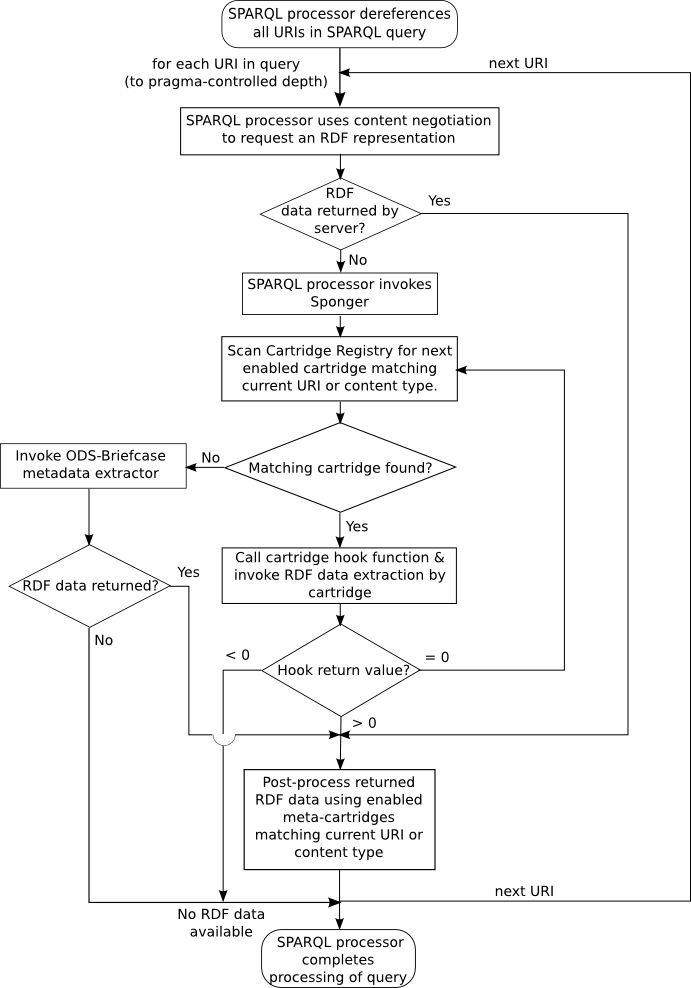
Figure 10: Sponger cartridge invocation flowchart
Meta-Cartridges
Thus far our description of cartridges and the RDF generation process has focussed on 'primary' Sponger cartridges. Virtuoso also supports another cartridge type - a 'meta-cartridge '. Meta-cartridges act as post-processors in the cartridge pipeline, augmenting entity descriptions in an RDF graph with additional information gleaned from 'lookup' data sources and web services. The lookup web service typically offers a REST API that provides full text search and which is used as the basis for meta-cartridges to add triples to the Sponger graph construction pipeline.
The way a meta-cartridge operates is essentially the same as a primary cartridge, that is it has a cartridge hook function with the same signature and it inserts data into the quad store through entity extraction and ontology mapping as before. Where meta-cartridges differ from primary cartridges is in their intent and their position in the cartridge invocation pipeline. The purpose of meta-cartridges is to enrich graphs produced by other (primary) cartridges. They serve as general post-processors to add additional information about selected entities in an RDF graph. The added triples typically expose the extra information through the "rdfs:seeAlso" predicate.
Virtuoso includes a number of meta-cartridges to utilize lookup and classification services such as Calais (entity identification from unstructured documents), Zemanta (recommendation of related content), Hoovers (company and industry facts) and UMBEL (a classification framework for subject concept references). Another example is the 'World Bank' meta-cartridge which adds information relating to a country's GDP, its exports of goods and services as a percentage of GDP etc; retrieved using the World Bank web service API.
Meta-cartridges in the meta-cartridge registry are configured to match a given MIME type or URI pattern. Matching meta-cartridges are invoked in order of their configured sequence value. Ordinarily the meta-cartridge hook function should return 0, in which case the next meta-cartridge in the post-processing chain will be invoked. If it returns 1 or -1, the post-processing stops and no further meta-cartridges are invoked. Notice that, as shown in the above flowchart, if the target URL returns RDF directly meta-cartridges may be invoked even if primary cartridges are not.
Note: Meta-cartridges are only available in the closed source version of Virtuoso. The meta-cartridge feature is disabled in Virtuoso Open Source edition (VOS). Meta-cartridge stylesheets reside in DAV/VAD/cartridges/xslt/meta. In VOS, this directory is empty.
Sponger Configuration Using Conductor
The Virtuoso Conductor provides a graphical UI for most Virtuoso administration tasks, including interfaces for managing Sponger Cartridges.
Cartridge Packaging & Deployment
The cartridges VAD (Virtuoso Application Distribution) bundles a variety of pre-built cartridges for generating RDF instance data from a large range of popular Web resources and file types. Appendix B provides full details of the VAD's contents. The cartridges installed by the VAD can be viewed and configured through Conductor's Cartridges pane reached via the RDF > Sponger tabs.
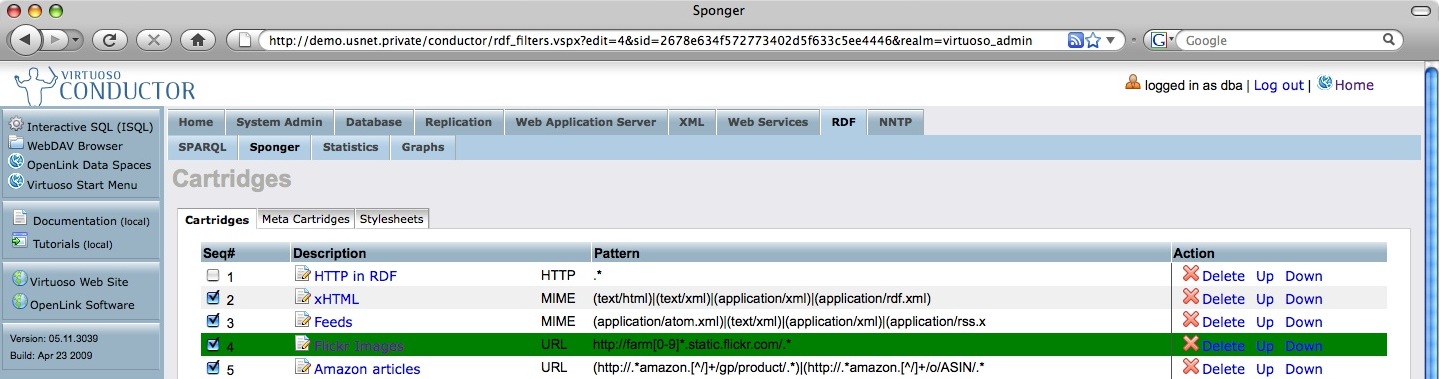
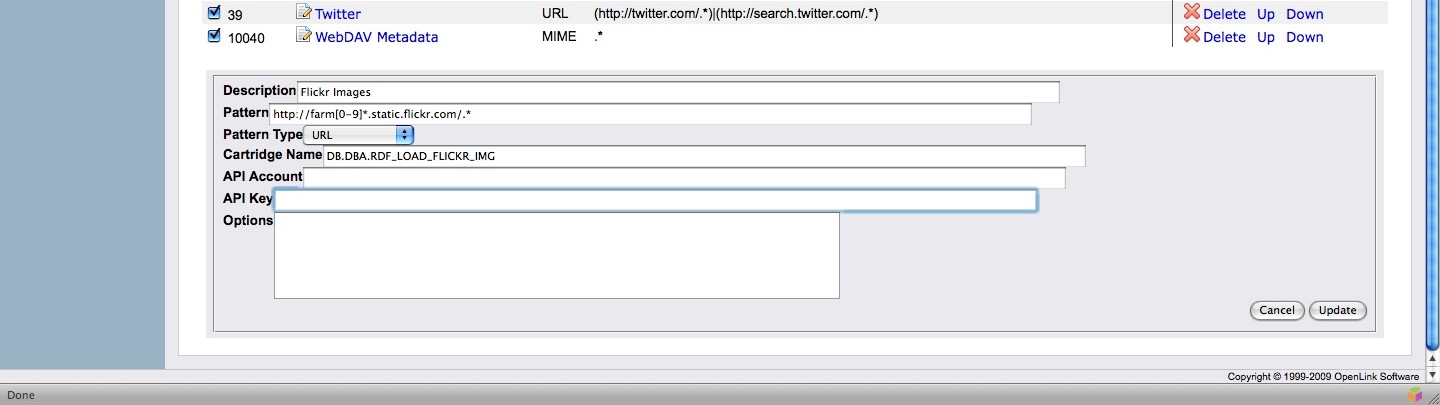
Figure 11: Conductor's RDF Cartridges pane
Earlier we outlined the structured data generation pipeline in which the search sequence for possible sources of metadata is controlled by the RDF cartridge ordering. This ordering can configured through the Conductor UI, as shown. The order in which cartridges are tried is reflected in the 'Seq#' values.
Among the various entry fields are fields for the cartridge hook function and the URL/MIME-type pattern, corresponding to the RM HOOK and RM_PATTERN columns of the SYS_RDF_MAPPERS table.

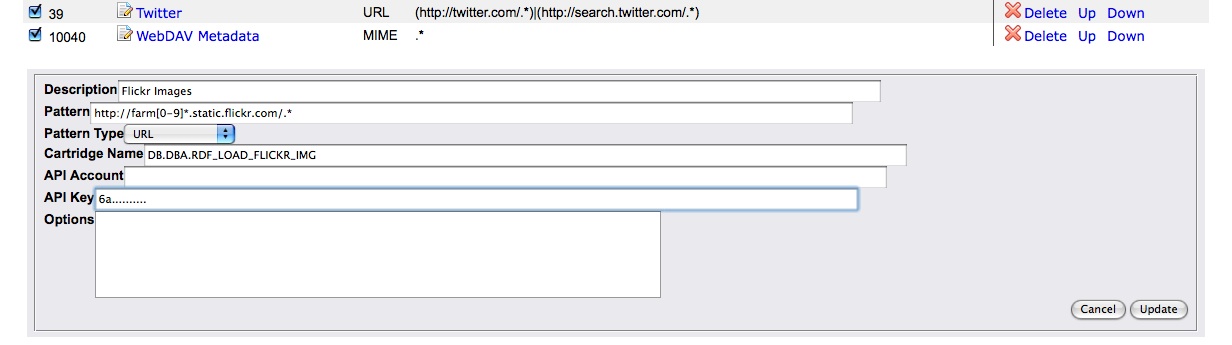
Figure 12: Flickr cartridge configuration settings
XSLT Templates
The RDF Cartridges VAD package includes a number of XSLT templates, all located in the folder /DAV/VAD/cartridges/xslt/main/. All the available templates can be viewed through Virtuoso's WebDAV browser, as illustrated below.
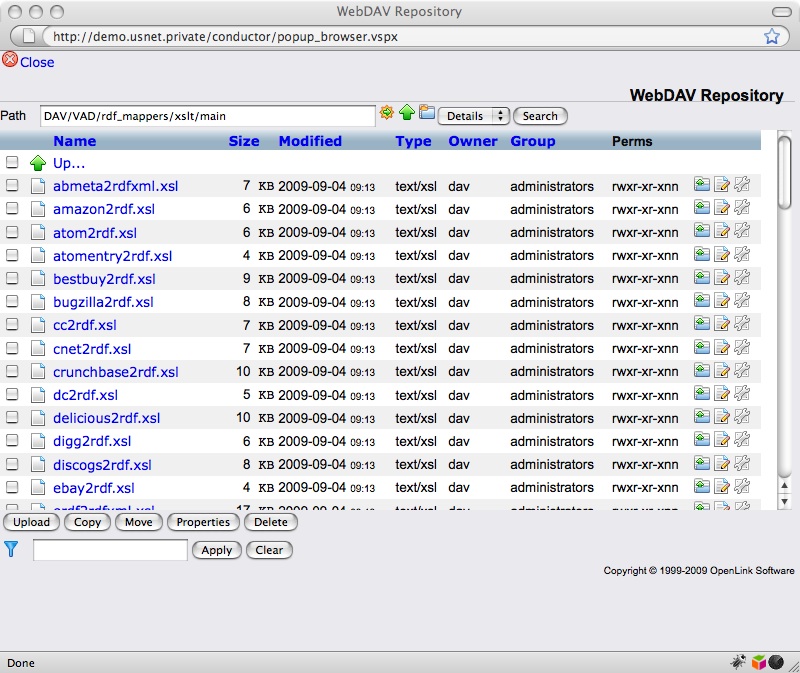
Figure 13: RDF Cartridges VAD package - XSLT templates
GRDDL Mappings
Some of the XSLT templates contained in /DAV/VAD/cartridges/xslt/main/ are GRDDL filters.
The GRDDL filters can be configured through the GRDDL Mappings panel in Conductor.
The URI for stylesheets stored in a Virtuoso WebDAV repository takes the form virt://WS.WS.SYS.DAV_RES.RES_FULL_PATH.RES_CONTENT.
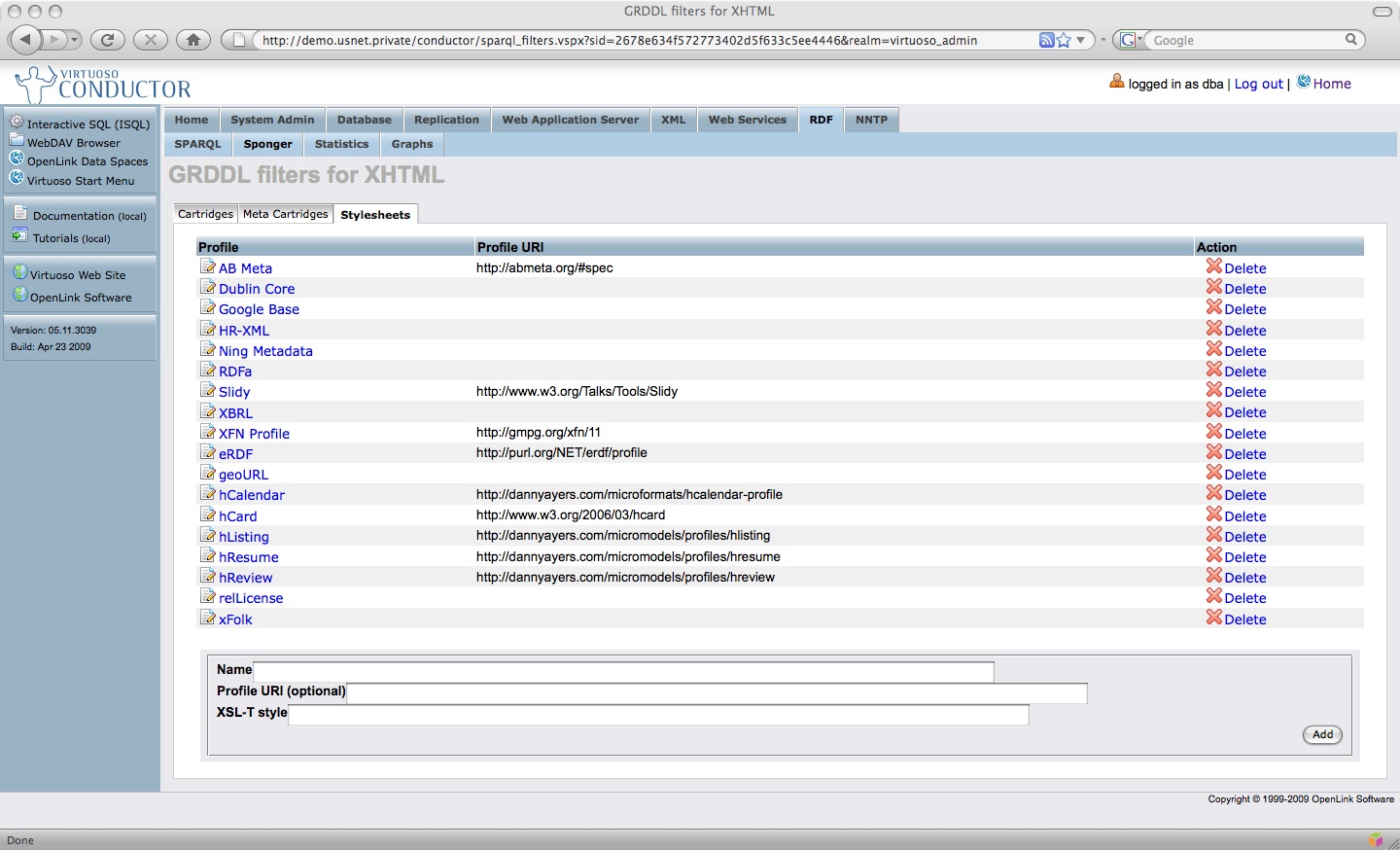
Figure 14: RDF Cartridges VAD package - GRDDL filters
Meta-Cartridges
As with 'primary' cartridges, Conductor provides a panel for managing meta-cartridges.
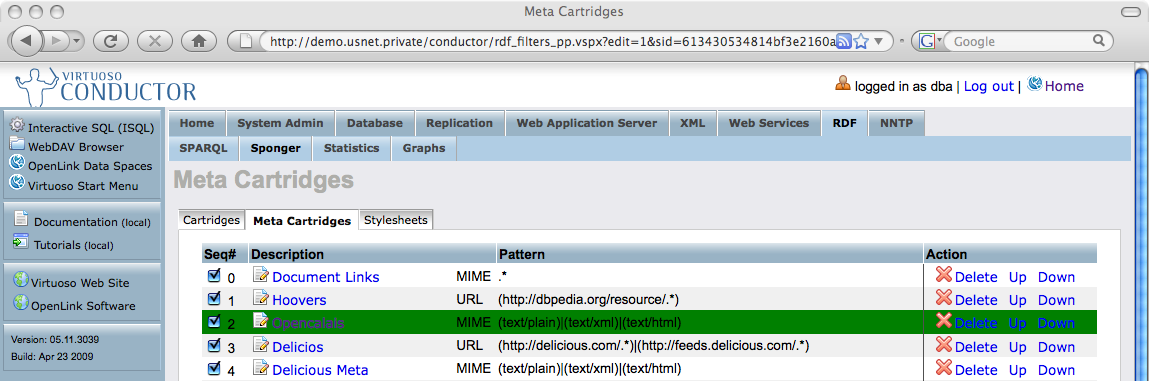
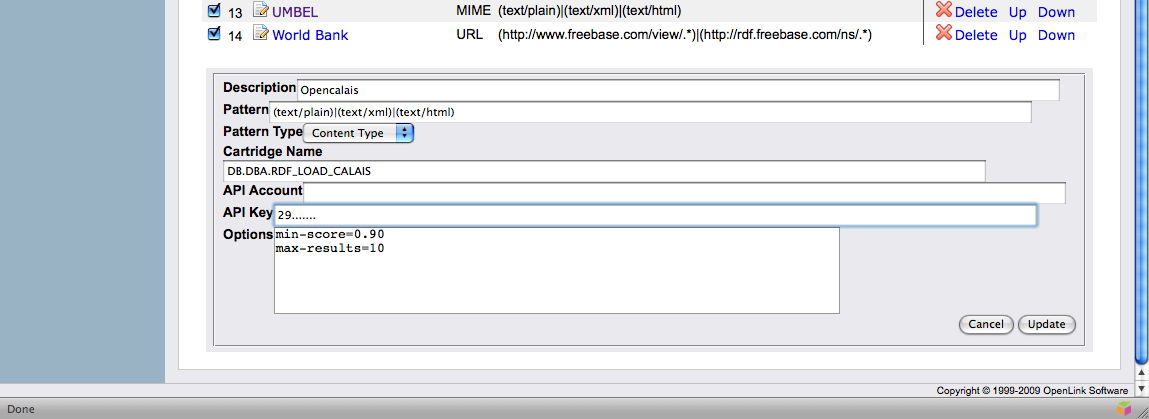
Figure 15: Conductor's RDF Meta-cartridges pane
Like primary cartridges, meta-cartridges can be scoped to a URL or content-type (MIME type) by specifying an appropriate pattern. Subject to it being written to be data-source agnostic, associating a meta-cartridge with one or more content-types is generally preferable to scoping by URL.
Custom Cartridges
The Sponger is fully extensible by virtue of its pluggable Cartridge architecture. New data formats can be fetched by creating new cartridges. While OpenLink is actively adding cartridges for new data sources, you are obviously free to develop your own custom cartridges. To this end, details of the cartridge hook and example cartridge implementations are presented below.
Cartridge Hook Prototype
Every Virtuoso PL hook function used to plug a custom Sponger cartridge into the Virtuoso SPARQL engine must have a parameter list with the following parameters (the names of the parameters are not important, but their order and presence are) :
in graph_iri varchar : the IRI of the graph currently being retrieved/crawled
in new origin_uri varchar : the URL of the document being retrieved
in destination varchar : the destination/target graph IRI
inout content any : the content of the document retrieved by Sponger
inout async_queue any : if the PingService initialization parameter has been configured in the [SPARQL] section of the virtuoso.ini file, this is a pre-allocated asynchronous queue to be used to call the PingTheSemanticWeb notification service
inout ping_service any : the URL of a ping service, as assigned to the PingService parameter in the [SPARQL] section of the virtuoso.ini configuration file. This argument could be used to notify the PingTheSemanticWeb notification service
inout api_key any : a string value specific to a given cartridge, contained in the RM_KEY column of the DB.DBA.SYS_RDF_MAPPERS table. The value can be a single string or a serialized array of strings providing cartridge specific data
inout opts any : cartridge specific options held in a Virtuoso PL vector which acts as an array of key-value pairs.
Example Cartridge Implementations
The examples which follow provide a brief insight into the basic internals of a cartridge. For more in-depth descriptions of how to write custom cartridges, please refer to the Sponger Cartridge Programmer's Guide .
Basic Sponger Cartridge
In our first example (which is available in the form of an on-line tutorial ) we implement a basic cartridge, which maps the MIME type text/plain to an imaginary ontology which extends the class Document from FOAF with properties 'txt:UniqueWords?' and 'txt:Chars', where the prefix 'txt:' is specified as 'urn:txt:v0.0:'.
use DB;

create procedure DB.DBA.RDF_LOAD_TXT_META
(
  in graph_iri varchar,
  in new_origin_uri varchar,
  in dest varchar,
  inout ret_body any,
  inout aq any,
  inout ps any,
  inout ser_key any
)
{
  declare words, chars int;
  declare vtb, arr, subj, ses, str any;
  declare ses any;
  -- if any error we just say nothing can be done
  declare exit handler for sqlstate '*'
  {
    return 0;
  };
  subj := coalesce (dest, new_origin_uri);
  vtb := vt_batch ();  chars := length (ret_body);
  -- using the text index procedures we get a list of words
  vt_batch_feed (vtb, ret_body, 1);
  arr := vt_batch_strings_array (vtb);
  -- the list has 'word' and positions array, so we must divide by 2
  words := length (arr) / 2;
  ses := string_output ();

  -- we compose a N3 literal
  http (sprintf ('<%s> <http://www.w3.org/1999/02/22-rdf-syntax-ns#type>    <http://xmlns.com/foaf/0.1/Document> .\n', subj), ses);
  http (sprintf ('<%s> <urn:txt:v0.0:UniqueWords> "%d" .\n', subj, words), ses);
  http (sprintf ('<%s> <urn:txt:v0.0:Chars> "%d" .\n', subj, chars), ses);
  str := string_output_string (ses);
  -- we push the N3 text into the local store
  DB.DBA.TTLP (str, new_origin_uri, subj);
  return 1;
};

delete from DB.DBA.SYS_RDF_MAPPERS where RM_HOOK = 'DB.DBA.RDF_LOAD_TXT_META';
insert soft DB.DBA.SYS_RDF_MAPPERS (RM_PATTERN, RM_TYPE, RM_HOOK, RM_KEY, RM_DESCRIPTION)
    values ('(text/plain)', 'MIME', 'DB.DBA.RDF_LOAD_TXT_META', null, 'Text Files (demo)');
-- Set invocation order (RM_ID) to some large number so we don't break existing cartridges
update DB.DBA.SYS_RDF_MAPPERS set RM_ID = 2000 where RM_HOOK = 'DB.DBA.RDF_LOAD_TXT_META';
To test the cartridge you can use /sparql endpoint with option 'Retrieve remote RDF data for all missing source graphs' to execute:
select * from <URL-of-a-txt-file> where { ?s ?p ?o }
Notice in this example the use of DB.DBA.TTLP( ) to load the extracted structured data into the Virtuoso Quad Store. This RDF data import function parses TTL (TURTLE or N3) and inserts the triples into the table DB.DBA.RDF_QUAD, one of the key tables underpinning the Quad Store. For further details of Virtuoso's RDF and SPARQL API, please refer to the OpenLink Virtuoso Reference Manual .
Flickr Cartridge
The next example shows the Virtuoso/PL procedure RDF_LOAD_FLICKR_IMG at the heart of the Virtuoso's Flickr Sponger cartridge:
--no_c_escapes-
  create procedure DB.DBA.RDF_LOAD_FLICKR_IMG (
  in graph_iri varchar, in new_origin_uri varchar, in dest varchar,
  inout _ret_body any, inout aq any, inout ps any, inout _key any,
  inout opts any)
  {
  declare xd, xt, url, tmp, api_key, img_id, hdr, exif any;
  declare exit handler for sqlstate '*'
  {
  return 0;
  };

  tmp := sprintf_inverse (new_origin_uri,
  'http://farm%s.static.flickr.com/%s/%s_%s.%s', 0);
  img_id := tmp[2];
  api_key := _key;
  --cfg_item_value (virtuoso_ini_path (), 'SPARQL', 'FlickrAPIkey');
  if (tmp is null or length (tmp) <> 5 or not isstring (api_key))
  return 0;
  url := sprintf
  ('http://api.flickr.com/services/rest/?method=flickr.photos.getInfo&photo_id=%s&api_key=%s', img_id, api_key);
  tmp := http_get (url, hdr);
  if (hdr[0] not like 'HTTP/1._ 200 %')
  signal ('22023', trim(hdr[0], '\r\n'), 'RDFXX');
  xd := xtree_doc (tmp);
  exif := xtree_doc ('<rsp/>');
  {
  declare exit handler for sqlstate '*' { goto ende; };
  url := sprintf   ('http://api.flickr.com/services/rest/?method=flickr.photos.getExif&photo_id=%s&api_key=%s', img_id, api_key);
  tmp := http_get (url, hdr);
  if (hdr[0] like 'HTTP/1._ 200 %')
  exif := xtree_doc (tmp);
  ende:;
  }
  xt := xslt (registry_get ('_cartridges_path_') || 'xslt/main/flickr2rdf.xsl', xd,
  vector ('baseUri', coalesce (dest, graph_iri), 'exif', exif));
  xd := serialize_to_UTF8_xml (xt);
  DB.DBA.RDF_LOAD_RDFXML (xd, new_origin_uri, coalesce (dest, graph_iri));
  return 1;
  }
Here the http_get( ) function retrieves an HTML page associated with the specified image, which is then parsed into an XML entity and in-memory XML parse tree by xtree_doc( ). Using the xslt( ) function with the stylesheet flickr2rdf.xsl, the XML entity is transformed into RDF/XML which is in turn parsed by RDF_LOAD_RDFXML( ) and the extracted triples loaded into the Virtuoso Quad Store.
Sponger Permissions
In order to allow the Sponger to update the local RDF quad store with triples constituting the Network Resource structured data being fetched, the role "SPARQL_UPDATE" must be granted to the account "SPARQL". This should normally be the case. If not, you must manually grant this permission. As with most Virtuoso DBA tasks, the Conductor provides the simplest means of doing this.
Custom Resolvers
The Sponger supports pluggable "Custom Resolver" cartridges in order to support the dereferencing of other forms of URIs besides HTTP URLs, such as URN schemes. The handle-based DOI naming scheme, the URN naming scheme, and also the URN-based LSID scheme, are examples of custom resolvers.
By supporting alternate resolvers the range of data sources which can be linked into the Semantic Data-Web is extended enormously. The LSID resolver enables URN-based resources to be accessible as linked data. Similarly, the DOI resolver permits the huge collection of DOI-based data sources to be linked into the Web of Linked Data (Data Web).
An example SPARQL query dereferencing a URN-based URI is shown below:
http://demo.openlinksw.com/sparql?default-graph-uri=urn:lsid:ubio.org:namebank:11815&should-sponge=soft&query=SELECT+*+WHERE+{?s+?p+?o}&format=text/html&debug=on
As one would expect, the RDF Proxy Service also recognizes URNs. e.g:
http://demo.openlinksw.com/proxy/rdf/?url=urn:lsid:ubio.org:namebank:11815&force=rdf
Sponger Usage Examples
RDF Proxy Service Example
The file http://www.ivan-herman.net/foaf.html contains a short profile of the W3C Semantic Web Activity Lead Ivan Herman. This XHTML file contains RDF embedded as RDFa. Running the file through the Sponger via Virtuoso's RDF proxy service extracts the embedded FOAF data as pure RDF, as can be seen by executing
curl -H "Accept: application/rdf+xml" http://linkeddata.uriburner.com/about/rdf/http://www.ivan-herman.net/foaf.html
(linkeddata.uriburner.com hosts a public Virtuoso instance.) Though this example demonstrates the action of the /about/rdf/ service quite transparently, it is a basic and unwieldy way to view RDF. As described earlier, the OpenLink Data Explorer uses the same proxy service to provide a more polished means to extract and view the fetched RDF data.
SPARQL Processor
As an alternative to using the RDF proxy service, we can perform Network Resource Fetch directly from within the SPARQL processor. After logging into Virtuoso's Conductor interface, the following query can be issued from the Interactive SQL (iSQL) panel:
sparql
define get:uri "http://www.ivan-herman.net/foaf.html"
define get:soft "soft"
select * from <http://mygraph> where {?s ?p ?o}
Here the sparql keyword invokes the SPARQL processor from the SQL interface and the Network Resource RDF data being fetched from page http://www.ivan-herman.net/foaf.html is loaded into the local RDF quad store as graph http://mygraph .
The new graph can then be queried using the basic SPARQL client normally available in a default Virtuoso installation at http://localhost:8890/sparql/. e.g.:
select * from <http://mygraph> where {?s ?p ?o}
Custom Cartridge
The Virtuoso/PL code for a simple custom cartridge, DB.DBA.RDF_LOAD_TXT_META, was presented earlier. Included in the code was the SQL required to register the cartridge in the Cartridge Registry. Paste the whole of this code into Conductor's iSQL interface and execute it to define and register the cartridge.
Create a simple text document with a .txt extension. This must now be made Web accessible. A simple way to do this is to expose it as a WebDAV resource using Virtuoso's built-in WebDAV support. Login to Virtuoso's ODS Briefcase application, navigate to your Public folder and upload your text document, ensuring that the file extension is .txt, the MIME type is set to text/plain and the file permissions are rw-r--r--. If, for the purposes of this example, you logged into a local default Virtuoso instance as user 'dba' and uploaded a file named 'ODS_sponger_test.txt', the file would be Web accessible via the URL http://localhost:8890/DAV/home/dba/Public/ODS_sponger_test.txt.
To perform Network Resource Fetch of the document using the RDF_LOAD_TXT_META cartridge, use the basic SPARQL client available at http://localhost:8890/sparql to execute the query
select * from
<http://localhost:8890/DAV/home/dba/Public/ODS_sponger_test.txt>
where {?s ?p ?o}
with the option 'Retrieve remote RDF data for all missing source graphs' set.
RDFa Support - Ingest & Generation
With Yahoo and Google both having announced support for RDFa, this metadata markup syntax has assumed a new importance. Nonetheless, viewed in the context of OpenLink's RDF support, it simply constitutes another supported syntax for encoding RDF metadata, alongside RDF/XML, N3, Turtle, NTriples and JSON.
The Virtuoso Sponger will, via the xHTML cartridge, automatically ingest any RDFa found when sponging an XHTML resource and cache the extracted RDF in the quad store. Conversely, if a client requests a resource description in the form of XHTML, Virtuoso will embed RDFa into the returned XHTML automatically. Virtuoso can generate RDFa for a Network Resource being fetched even if the original resource was not described using RDFa. Likewise RDFa can be generated for resources whose RDF descriptions were imported directly into the quad store, rather than being fetched.
In our Deploying Linked Data Guide, we emphasize the distinction between a real world concept or entity and its, possibly many, descriptions, where each description is associated with a different media-type. When dereferencing an entity URI, the description returned is determined by the media-type(s) specified in any Accept headers expressing the client's preferred representation formats. As shown earlier in the examples from section New Proxy URI Formats, a client can request an RDFa description of an entity, i.e. XHTML+RDFa, either by supplying an Accept header with a media-type of application/xhtml+xml or text/html,
e.g.
or
curl -I -H "Accept: application/xhtml+xml" "http://linkeddata.uriburner.com/about/id/http/www.crunchbase.com/company/twitter"
or by using the /about/html proxy directly, e.g.:
curl -I -H "Accept: text/html" "http://linkeddata.uriburner.com/about/id/http/www.crunchbase.com/company/twitter"
e.g. curl -I "http://linkeddata.uriburner.com/about/html/http/www.bestbuy.com/site/olspage.jsp?skuId=9491935&type=product&id=1218115079278"
The /about/html proxy underpins the OpenLink Data Explorer's "View Page Metadata" option. The latter generates an XHTML+RDFa rendering of RDF metadata using the page description facilities of the VSP page description.vsp. (For a brief discussion of description.vsp please refer to Appendix A: Description.vsp - Rendering RDF as HTML in the Deploying Linked Data Guide.)
The screenshot below shows ODE's "View Page Metadata" output when http://www.crunchbase.com/company/twitter is fetched by the public Sponger at http://linkeddata.uriburner.com. The subsequent screenshot highlights some of the RDFa markup in a heavily cutdown extract from the description.vsp generated page source.
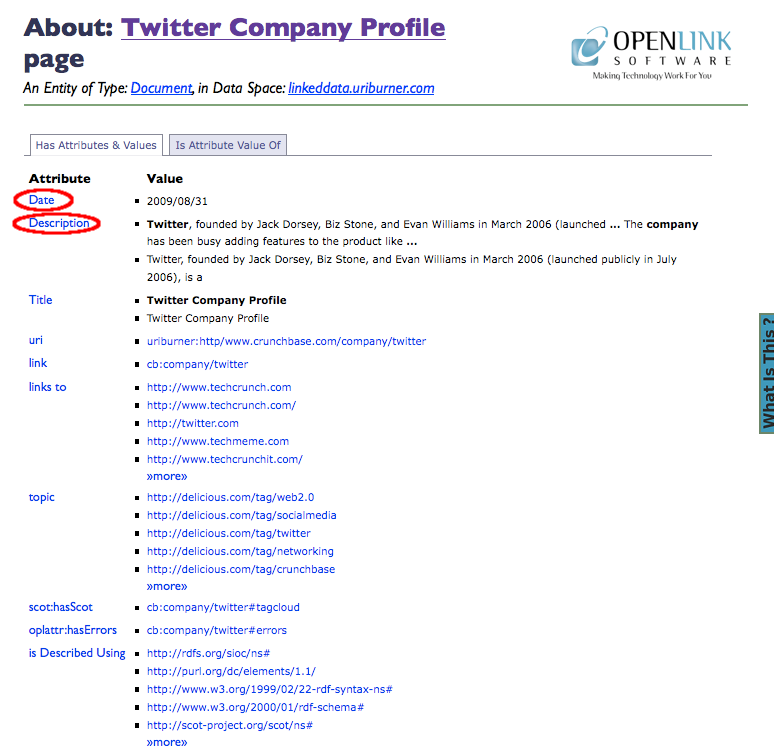
Figure 16: Fetched Twitter company profile
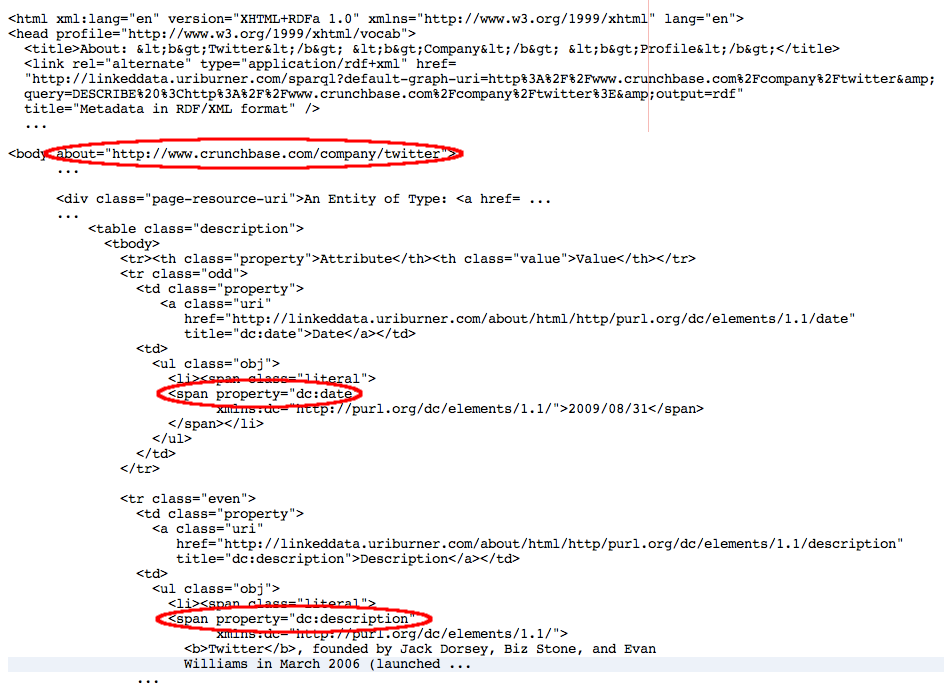
Figure 17: Page source extract highlighting snippets of generated RDFa
Essentially, in the description.vsp output page, values listed under the "Has Attributes & Values" tab are described using RDFa attributes @rel and @resource, if the object part of the triple is a URI, or using @property if the object part is a literal. Entities listed under the "Is Attribute Value Of" tab are described using RDFa attributes @rev and @resource.
Bear in mind that the /about/... proxies need not be specified directly by a client, that is they need not form part of the HTTP request URL. They can be invoked indirectly through appropriately configured URL rewriting rules. As described in detail in the Linked Data Deployment Guide section "Transparent Content Negotiation Examples", requests can be redirected via /about/html in response to a request for media-type application/xhtml+xml or text/html. In this way, assuming rewrite rules set up along the lines described in Transparent Content Negotiation Examples / DBpedia, a Yahoo or Google spider crawling http://dbpedia.org/resource/The_Beatles would be served XHTML+RDFa generated dynamically from the base RDF.
Appendix A: Ontologies Supported by ODS-Briefcase
The full range of ontologies and mappings supported by the ODS-Briefcase metadata extractor is reflected in the contents of the Virtuoso directory DAV/VAD/oDrive/schemas/ (e.g. for a local Virtuoso instance, this would be http://localhost:8890/DAV/VAD/oDrive/schemas/).
The schema directory is browsed easily using the Conductor WebDAV Browser.
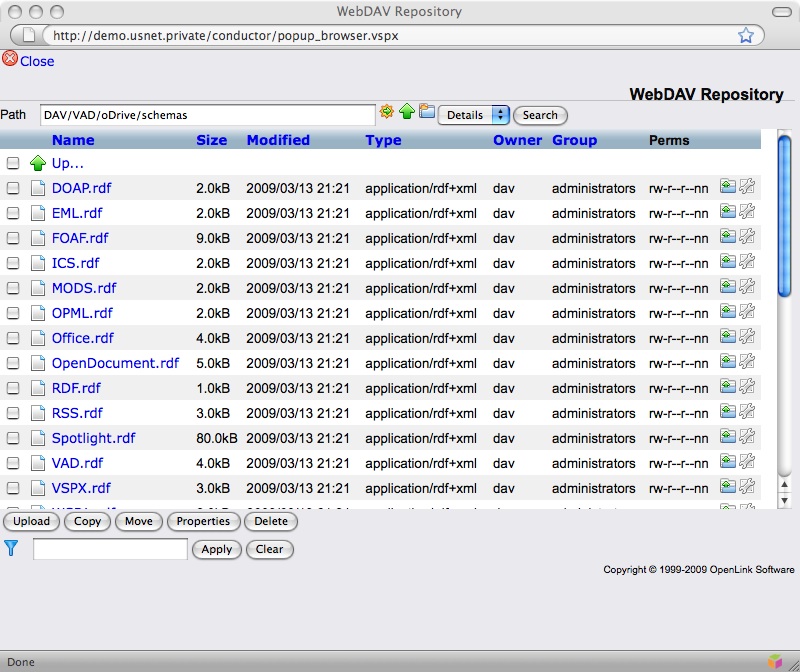
The schema files packaged in Briefcase cover both standard and custom ontologies. The standard ontologies include FOAF, OpenDocument?, RSS , XBEL , Apple Spotlight and vCard. Others are proprietary OpenLink ontologies for describing file types and content.
Below is a partial listing of one of these files, Office.rdf, which defines the proprietary Office ontology used by Virtuoso for mapping Microsoft Office documents to RDF structured data.
  <?xml version="1.0" encoding="UTF-8"?>
  <!--
  -
  -  $Id: Office.rdf,v 1.4 2007/05/10 08:51:53 ddimitrov Exp $
  -
  -  This file is part of the OpenLink Software Virtuoso Open-Source (VOS)
  -  project.
  -
  -  Copyright (C) 1998-2007 OpenLink Software
  -
  ...
  -
  -->
  <rdf:RDF xmlns:rdfs="http://www.w3.org/2000/01/rdf-schema#"
  xmlns:rdf="http://www.w3.org/1999/02/22-rdf-syntax-ns#"
  xmlns:owl ="http://www.w3.org/2002/07/owl#"
  xmlns:virtrdf="http://www.openlinksw.com/schemas/virtrdf#"
  xml:base="http://www.openlinksw.com/schemas/Office#">
  <owl:Ontology rdf:about="http://www.openlinksw.com/schemas/Office#">
  <rdfs:label>Microsoft Office document</rdfs:label>
  <rdfs:comment>The Microsoft Office format general attributes.</rdfs:comment>
  <virtrdf:catName>Office Documents (Microsoft)</virtrdf:catName>
  <virtrdf:version>1.00</virtrdf:version>
  </owl:Ontology>
  <rdf:Property rdf:about="http://www.openlinksw.com/schemas/Office#TypeDescr">
  <rdfs:Range rdf:resource="http://www.w3.org/2001/XMLSchema#string"/>
  <virtrdf:cardinality>single</virtrdf:cardinality>
  <virtrdf:label>Document Type</virtrdf:label>
  <virtrdf:catName>Document Type</virtrdf:catName>
  </rdf:Property>
  <rdf:Property rdf:about="http://www.openlinksw.com/schemas/Office#Author">
  <rdfs:Range rdf:resource="http://www.w3.org/2001/XMLSchema#string"/>
  <virtrdf:cardinality>single</virtrdf:cardinality>
  <virtrdf:label>Author</virtrdf:label>
  <virtrdf:defaultValue>No name</virtrdf:defaultValue>
  <virtrdf:catName>Author</virtrdf:catName>
  </rdf:Property>
  <rdf:Property rdf:about="http://www.openlinksw.com/schemas/Office#LastAuthor">
  <rdfs:Range rdf:resource="http://www.w3.org/2001/XMLSchema#string"/>
  <virtrdf:cardinality>single</virtrdf:cardinality>
  <virtrdf:label>Last Author</virtrdf:label>
  <virtrdf:defaultValue>No name</virtrdf:defaultValue>
  <virtrdf:catName>Last Author</virtrdf:catName>
  </rdf:Property>
  <rdf:Property rdf:about="http://www.openlinksw.com/schemas/Office#Company">
  <rdfs:Range rdf:resource="http://www.w3.org/2001/XMLSchema#string"/>
  <virtrdf:cardinality>single</virtrdf:cardinality>
  <virtrdf:label>Company</virtrdf:label>
  <virtrdf:defaultValue>No name</virtrdf:defaultValue>
  <virtrdf:catName>Company</virtrdf:catName>
  </rdf:Property>
  <rdf:Property rdf:about="http://www.openlinksw.com/schemas/Office#Words">
  <rdfs:Range rdf:resource="http://www.w3.org/2001/XMLSchema#integer"/>
  <virtrdf:cardinality>single</virtrdf:cardinality>
  <virtrdf:label>Word Count</virtrdf:label>
  </rdf:Property>
  ...
  <rdf:Property rdf:about="http://www.openlinksw.com/schemas/Office#Created">
  <rdfs:Range rdf:resource="http://www.w3.org/2001/XMLSchema#dateTime"/>
  <virtrdf:cardinality>single</virtrdf:cardinality>
  <virtrdf:label>Date Created</virtrdf:label>
  <virtrdf:catName>Created</virtrdf:catName>
  </rdf:Property>
  </rdf:RDF>
Appendix B: RDF Cartridges VAD Package
Virtuoso supplies cartridges for extracting RDF data from certain popular Web resources and file types in the form of the VAD (Virtuoso Application Distribution) package cartridges_dav.vad. If not already present, it can be installed using Conductor or the VAD_INSTALL function. Please refer to the Virtuoso Reference Manual for detailed information on VADs and VAD management.
Details of each of the cartridges contained in the cartridges VAD are given below.
HTTP in RDF
A cartridge for mapping HTTP request and response messages to the HTTP vocabulary expressed in RDF, as defined by http://www.w3.org/2006/http.rdfs .
This cartridge is disabled by default. If it is enabled, it must be first in the order of execution. The cartridge hook function always returns 0, allowing other cartridge to return additional RDF instance data.
XHTML and Feeds
This is a composite cartridge for discovering in HTML pages metadata embedded in a variety of forms. The cartridge looks for RDF data in the order listed below:
- Embedded/linked RDF
- Scans for metadata in a linked RDF document identified by a link element, e.g. <link rel="meta" type="application/rdf+xml" href="http://www.w3.org/TR/2004/REC-rdf-syntax-grammar-20040210/#section-rdf-in-HTML" see="see" a="a" style="absuri">Using RDF/XML with HTML and XHTML )
- RDF embedded in xHTML (as markup or inside XML comments)
- Micro-formats
- GRDDL / GRDDL Data Views - http://www.w3.org/2003/g/data-view
- eRDF - http://research.talis.com/2005/erdf/profile
- RDFa
- hCard - XMDP profile: http://www.w3.org/2006/03/hcard
- hCalendar - XMDP profile: http://dannyayers.com/microformats/hcalendar-profile
- hReview - XMDP profile: http://dannyayers.com/micromodels/profiles/hreview
- relLicense - Creative Commons (CC) license schema: http://web.resource.org/cc/schema.rdf
- Dublin Core (DCMI) - Vocabulary definition: http://purl.org/dc/elements/1.1/
- geoURL - Vocabulary definition: http://www.w3.org/2003/01/geo/wgs84_pos#
- Google Base - OpenLink Virtuoso specific mapping
- Ning Metadata
- Feeds extraction
- RSS/RDF - SIOC & AtomOWL
- RSS 1.0 - RSS/RDF, SIOC & AtomOWL
- Atom 1.0 - RSS/RDF, SIOC & AtomOWL
- RSS/RDF: http://purl.org/rss/1.0/
- SIOC - Vocabulary definition: http://rdfs.org/sioc/ns#
- AtomOWL - Vocabulary definition: http://atomowl.org/ontologies/atomrdf.rdf
- xHTML metadata transformation using FOAF (foaf:Document) and Dublin Core properties (dc:title, dc:subject etc.)
- FOAF - Vocabulary definition: http://xmlns.com/foaf/0.1/
Flickr Images / URLs
A Sponger cartridge for Flickr images, using the Flickr REST API. To function properly it must have a configured key. The Flickr cartridge generates RDF instance data using: CC license, Dublin Core, Dublin Core Metadata Terms, GeoURL, FOAF and EXIF (ontology definition: http://www.w3.org/2003/12/exif/ns/ ).
Amazon Articles / URLs
A cartridge for Amazon articles using the Amazon REST API. It needs a Amazon API key in order to be functional.
eBay Articles / URLs
Implements eBay's REST API in order to generate RDF from eBay articles. It needs a key and user name to be configured in order to work.
OpenOffice? Documents
OpenOffice? documents contain metadata which can be extracted using UNZIP, so this cartridge needs the Virtuoso UNZIP plugin to be configured on the server. (Each OpenOffice file is actually a collection of XML documents stored in a ZIP archive).
Yahoo Traffic Data URLs
Transforms Yahoo traffic data to RDF.
iCalendar Files
Transforms iCalendar files to RDF as per http://www.w3.org/2002/12/cal/ical# .
Binary Content, PDF & Powerpoint Files
Unknown binary content, PDF or MS PowerPoint files, or indeed any file type handled by an Aperture extractor, can be transformed to RDF using the Aperture framework, a Java framework for extracting and querying full-text content and metadata from various information systems (file systems, web sites, mail boxes etc) and file formats (documents, images etc). For details of how to configure the Aperture cartridge see Appendix C.
Appendix C: Configuring the Aperture Framework
In order to work, the Aperture cartridge requires a Virtuoso instance with Java hosting support, and the Aperture framework and the MetaExtractor.class to be installed on the host system.
To set up Virtuoso to host and run the Aperture framework, follow these steps:
- Install a Virtuoso binary which includes built-in Java hosting support (The executable name will indicate whether the required hosting support is built in - a suitably enabled executable will include javavm in the name, for example virtuoso-javavm-t, rather than virtuoso-t).
- Download the Aperture framework from http://aperture.sourceforge.net.
- Unpack the contents of the framework's lib directory into an 'aperture' subdirectory of the Virtuoso working directory, i.e. of the directory containing the database and virtuoso.ini files.
- Ensure the Virtuoso working directory includes a 'lib' subdirectory containing the file MetaExtractor.class. (At the current time MetaExtractor.class in not included in the cartridges VAD. Please contact OpenLink Technical Support to obtain a copy.)
- In the [Parameters] section of the virtuoso.ini configuration file:
- Add the line (linebreaks have been inserted for clarity):
JavaClasspath = lib:aperture/DFKIUtils2.jar:aperture/JempBox-0.2.0.jar:aperture/activation-1.0.2-upd2.jar:aperture/aduna-commons-xml-2.0.jar:
aperture/ant-compression-utils-1.7.1.jar:aperture/aperture-1.2.0.jar:aperture/aperture-examples-1.2.0.jar:aperture/aperture-test-1.2.0.jar:
aperture/applewrapper-0.2.jar:aperture/bcmail-jdk14-132.jar:aperture/bcprov-jdk14-132.jar:aperture/commons-codec-1.3.jar:aperture/commons-httpclient-3.1.jar:
aperture/commons-lang-2.3.jar:aperture/demork-2.1.jar:aperture/flickrapi-1.0.jar:aperture/fontbox-0.2.0-dev.jar:aperture/htmlparser-1.6.jar:
aperture/ical4j-1.0-beta4.jar:aperture/infsail-0.1.jar:aperture/jacob-1.10.jar:aperture/jai_codec-1.1.3.jar:aperture/jai_core-1.1.3.jar:aperture/jaudiotagger-1.0.8.jar:
aperture/jcl104-over-slf4j-1.5.0.jar:aperture/jpim-0.1-aperture-1.jar:aperture/junit-3.8.1.jar:aperture/jutf7-0.9.0.jar:aperture/mail-1.4.jar:
aperture/metadata-extractor-2.4.0-beta-1.jar:aperture/mstor-0.9.11.jar:aperture/nrlvalidator-0.1.jar:aperture/openrdf-sesame-2.2.1-onejar-osgi.jar:
aperture/osgi.core-4.0.jar:aperture/pdfbox-0.7.4-dev-20071030.jar:aperture/poi-3.0.2-FINAL-20080204.jar:aperture/poi-scratchpad-3.0.2-FINAL-20080204.jar:
aperture/rdf2go.api-4.6.2.jar:aperture/rdf2go.impl.base-4.6.2.jar:aperture/rdf2go.impl.sesame20-4.6.2.jar:aperture/rdf2go.impl.util-4.6.2.jar:
aperture/slf4j-api-1.5.0.jar:aperture/slf4j-jdk14-1.5.0.jar:aperture/unionsail-0.1.jar:aperture/winlaf-0.5.1.jar
- Ensure
DirsAllowedincludes directories/tmp(or other temporary directory for the host operating system),lib, andaperture.
- Add the line (linebreaks have been inserted for clarity):
- Start the Virtuoso server
- Configure the cartridge either by installing the cartridges VAD or, if the VAD is already installed, by executing procedure DB.DBA.RDF_APERTURE_INIT.
- During the VAD installation process, RDF_APERTURE_INIT() configures the Aperture cartridge. If you look in the list of available cartridges under the RDF > Sponger tab in Conductor, you should see an entry for 'Binary Files'.
To check the cartridge has been configured, connect with Virtuoso's ISQL tool:
- Issue the command
SQL > select udt_is_available('APERTURE.DBA.MetaExtractor');
- Copy a test PDF document to the Virtuoso working directory, then execute
SQL> select APERTURE.DBA."MetaExtractor"().getMetaFromFile ('some_pdf_in_server_working_dir.pdf', 0);
... some RDF data should be returned ...
You should now be able to retrieve all document types supported by the Aperture framework, (using one of the standard Sponger invocation mechanisms, for instance with a URL of the form http://localhost:8890/about/rdf/http://targethost/targetfile.pdf), subject to the MIME type pattern filters configured for the cartridge in the Conductor UI. By default the Aperture cartridge is registered to match MIME types (application/octet-stream)|(application/pdf)|(application/mspowerpoint). To retrieve all the MIME types Aperture is capable of handling, changed the MIME type pattern to 'application/.*'.
Important: The installation guidelines presented above have been verified on Mac OS X with Aperture 1.2.0. Some adjustment may be needed for different operating systems or versions of Aperture.
Glossary
Aperture - a Java framework for extracting and querying full-text content and metadata from various information systems (file systems, web sites, mail boxes etc) and file formats (documents, images etc).
CRNI Handle System - provides unique persistent identifiers (handles) for Internet resources. It is a general purpose distributed information system providing identifier and resolution services through a namespace and an open set of protocols which allow handles to be resolved into the information necessary to locate, access and use the resources they identify.
Data Spaces - points of presence on the web for accessing structured data gleaned from a variety of heterogeneous data sources.
DOI - a digital object identifier. A location-independent, permanent document or digital resource identifier, based on the CNRI Handle System, which does not change, even if the resource is relocated. DOIs are resolved through the DOI resolver.
eRDF - HTML Embeddable RDF. A technique for embedding a subset of RDF into (X)HTML.
hCard - a microformat for publishing the contact details of people, companies, organizations, and places, in (X)HTML, Atom, RSS, or arbitrary XML.
geoURL - is a location-to-URL reverse directory allowing you to find URLs by their proximity to a given location.
GRDDL -Gleaning Resource Descriptions from Dialects of Languages - a mechanism for extracting RDF data from XML and XHTML documents using transformation algorithms typically represented in XSLT. The transformation algorithms may be explicitly associated using a link element in the head of the document, or held in an associated metadata profile document or namespace document.
Linked Data - A Data Access by Reference mechanism that uses HTTP as a pointer system for accessing the negotiated representation of resource/entity descriptions. For example, an RDF model based resource description can be projected (represented) using (X)HTML, N3, Turtle or RDF/XML via content negotiation. At all times the data access mechanism and ultimate presentation/representation format are distinct.
LSID - a life science identifier.
A URN-based identifier for a piece of Web-based biological information.
LSIDs occupy one namespace (urn:lsid) in the URN naming scheme.
microformats - markup that allows the expression of semantics in an HTML (or XHTML) web page. Programs can extract meaning from a standard web page that is marked up with microformats.
Ning - an online platform for creating social networks and websites
ODS - OpenLink Data Spaces . A new generation distributed collaborative application platform for creating Semantic Web presence via Data Spaces derived from: weblogs, wikis, feed aggregators, photo galleries, shared bookmarks, discussion forums, and more.
PingTheSemanticWeb - a repository for RDF documents. You can notify this service that you have created or updated an RDF document on your web site, or you can import a list of recently created or updated RDF documents.
RDF browser - a piece of technology that enables you to browse RDF data sources by traversing data links. The key difference between this approach and traditional browsing is that RDF data links are typed (they possess inherent meaning and context) whereas traditional HTML links are untyped. There are a number of RDF Browsers currently available, including OpenLink's ODE , Tabulator and DISCO .
Spotlight - a file system metadata extraction and search facility in Mac OS X.
structured data - data organized into semantic chunks or entities, with similar entities grouped together in relations or classes. (Michael Bergman provides an in-depth discussion of current Semantic Web terminology, and proposals for bringing more clarity to this area, in his post More Structure, More Terminology and (hopefully) More Clarity ).
URIQA - The URI Query Agent Model . A model for interacting with Semantic Web enabled web servers. It introduces new HTTP methods to indicate to a web server that, for a given resource URI, it should return a concise bounded description of that resource rather than a representation of it.
URN - Uniform Resource Name. A form of Uniform Resource Identifier (URI) which uniquely identifies a resource but which, unlike a Uniform Resource Locator (URL), does not specify its location.
VAD - Virtuoso Application Distribution. A packaging and distribution system for extending Virtuoso. A VAD encapsulates the components of a self-contained Virtuoso application, including table creation, default data, stored procedures, web services, and content. VADs are easily installed through Virtuoso's Conductor browser interface.